Stereo Tool

FM and AM broadcast radio processing has gone through many iterations.  At first, the main processing function was to limit the input audio to a transmitter and prevent over-modulation.  This was a particular problem with early tube-type AM transmitters, where over-modulation could create power supply overloads and kill the carrier while engineers scrambled around resetting things and hopefully pressing various buttons to get the transmitter back on the air.

Over the years, processors incorporated not just limiting, but compression, gating, equalization, clipping, and so on all in an effort to keep ahead or at least abreast of the station across town.

Today, broadcast air chain processors come in all shapes and flavors.  In addition to that, internet streaming stations have their own unique set of issues to deal with.  The top-of-the-line Telos Omina or Orban Optomod systems are great, however, they can set one back a pretty large sum of money.  Enter then, the Stereo Tool PC based software processing program.
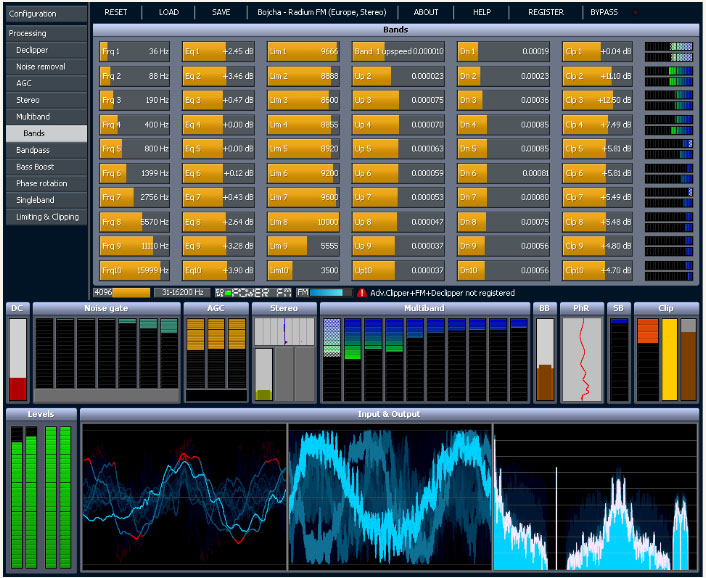
Stereo Tool sofware screen shot

The first difference between, say the Omina and Stereo Tool is the end user decides the hardware and basic operating system.  The second difference is Stereo Tool comes with a free trial.  Then there is the price difference, which ranges from about $48.00 US for the basic version, to $161.00 US for the basic FM version and finally $269.00 US for the full version (actual prices are in Euros, which will fluctuate day to day and the credit card company will likely charge an exchange fee).  Add to that a medium-speed (2 Ghz) Intel Pentium4 or better computer, 1 Gb or more of RAM, good sound card and it all comes out to a reasonably priced audio processor.

Here are some of the specific features for broadcasting:

  • Declipper
  • Hiss Removal Filter
  • FM Hiss Removal Filter
  • Automatic Gain Control (AGC)
  • 10-band multiband compressor / limiter / clipper
  • Phasing error (AZIMUTH) correction filter
  • Stereo booster
  • Bass booster
  • Final limiter
  • Distortion masking Loudness filter
  • Lowpass filter
  • FM pre-emphasis filter
  • FM stereo encoder
  • FM RDS encoder
  • Composite limiter

Much more info at the Stereo Tool website.

The idea of PC-based audio processing is new and interesting to most of us.  The designer and owner of Stereo Tool, Hans van Zutphen, was nice enough to answer a few questions I posed to him via email:

PT: What prompted you to write audio processing software?

HvZ: Since I was very little I’ve always wanted to have my own radio station. I remember playing with walkie-talkies and trying to receive their sound on a real radio when I was about 8 or 9. I never really did anything with it until I found out in 2001 that you could easily start a webradio station – I actually found out because I was listening to a pirate station in my car which turned out to have a stream; within a week my own station was online.

Of course, I needed a bit of processing for it, and I wrote some command line tools – a single band compressor, a stereo-to-mono converter that didn’t cause any loss of audio (I was broadcasting hard trance on a mono 56 kbit/s stream, and this was the only way to get a decent sound out of it), and sometime later a multiband compressor.

In 2004 I left the company I worked for (ASML, they make machines to make computer chips, customers are companies like Intel, AMD etc.) to start working for Philips Healthcare, where I was going to work on image processing for X-Ray systems. I had 2 months of ‘spare time’ between those jobs, and I wanted to learn to program in Visual C++, so I decided to a GUI around my command line tools, and make a Winamp plugin out of it. I called it ‘Radio Tool’. I never really planned to do anything with it, it was just an exercise project.

About a year later I came across the Winamp site again and I saw that you could upload plugins. So I uploaded my program, now renamed to ‘Stereo Tool’ because a Google search for “Radio Tool” gave far too many hits. Within a week there were over 1000 downloads and a while later it surpassed 90,000. At that point I decided to create a new version, Stereo Tool 2.0.

For quite a while this remained a hobby project, I occasionally worked on it for a few months and then I wouldn’t look at it for months. But at some point I was approached by someone people who worked at a “real” (FM) Dutch radio stations who asked for some extra features – he couldn’t get the audio loud enough, and that’s how I got into clipping. Things started to get better, I learned more and more about processing, the number of downloads increased and people became more and more enthusiastic about it. At some point, after reading something about how an FM stereo signal looks, I thought it might be possible to output a stereo signal with a 192 kHz sound card, so I bought one and did some tests and it worked that same night, and within a few weeks I added RDS.

PT: Do you know, approximately, how many stations (AM/FM/internet) Stereo Tool is being used on?

HvZ: FM: About 500, ranging from small community and pirate stations up to large nation-wide stations which run Stereo Tool at a dozen transmitter sites. Streaming: Not sure, but definitely over 1,000, probably a lot more.

PT: I have read through the forums on your site, Stereo Tool looks like a very complete processing system. Any plans for new features, future upgrades, etc?

HvZ: Yes. I’m currently working on a new multiband compressor. The multiband compressor in Stereo Tool is still based on the code that I wrote in 2001 for my webradio station, which in turn was based on an even older version that I had used on 8-bit audio. It also has far too many bands. Because of this, the multiband compressor is currently the weak spot of Stereo Tool. In the last weeks, I have made a new single-band compressor that sounds a lot better, it actually outperforms other compressors I have tested, and I expect great results for the new multiband compressor, which will also have fewer bands. Something else that I’ve been planning for a long time is a composite clipper, which will add 1-2 dB of extra loudness and especially better highs. Stereo Tool can already be louder with good audio quality than nearly any hardware box on the market (see for example this video, Radio 538 uses an Orban 8600 http://www.youtube.com/watch?v=4VpfcqUPQys – unfortunately due to the mpeg compression it’s a bit difficult to compare but listen for distortion ) – but there’s always room for improvement.

PT: What are the advantages of a PC software-based processor vs. a hardware-based (e.g. Omni or Optomod)?

HvZ: Ah, good question. Not sure if it’s the right question… With processing, a lot of things come down to taste, and there are several stations that have replaced their hardware processing with Stereo Tool not because it’s software and PC based but because they preferred the audio that comes out of it. Stereo Tool is also one of only 2 processors that contain a de clipper (the other one is the Omnia 9, I licensed my de clipper to them). For a demo of the declipper see: http://www.youtube.com/watch?v=oqOljvx9KaM

Also, Stereo Tool contains a stereo and RDS coder, but most other processors don’t, so instead of having a whole bunch of devices everything can be done in a single PC, which also results in better quality. Recently I added a new feature that enables synchronizing multiple FM transmitter signals that all connect to a simple Shoutcast stream (video: http://www.youtube.com/watch?v=GYQ5CYs0ZX8 ), so you also don’t need any streaming hardware anymore.

Of course, there’s the price. A hardware box that gives “similar” quality (of course every processor sounds different, and it’s a matter of taste, so it’s difficult to compare, but I’m assuming that things like low volume levels, gain riding, distortion, and lack of clarity in the highs are bad) easily costs $10,000 or more. And you can always easily upgrade to new versions. If you already have a PC with enough spare processing power you don’t need to buy anything.

I know that some people at radio stations are ‘afraid’ of using a PC in their processing path, but based on feedback I get from the stations that run my software it’s completely stable – and of course, if a PC does break, you can replace it with any fast enough PC you have lying around – you just need to put the proper sound card in.

But for development, the advantages are huge. If you use DSPs, it’s usually a lot of work to even make a very small change. When I worked at Philips Healthcare, the image processing that had been done – without many changes – on DSPs for many years was being converted to PCs because of the speed of development and the price of hardware. Once the conversion was finished, the development speed increased dramatically and 2 years later the image quality had improved beyond anything that was imaginable with DSPs. PCs get faster every year, and you don’t have to do anything for that – for the same price the processing power that you can buy roughly doubles every 1.5 years, and if you pay more you can get even more. If you use DSPs, you have to do a lot of work yourself, you cannot just ‘buy a faster DSP’. Testing things is very easy, I can write some code that does something new, post it on my forum and I’ll have feedback from users the next morning – with DSP that’s a LOT more difficult and it takes a lot more time. I’ve learned by now that everyone hears things in a different way, and occasionally there are groups of people who hear something they find very annoying while many other people (often including myself) don’t hear anything wrong with it at all. Especially in cases like this, it’s really great to be able to quickly send new versions to several people all around the world for testing.

PT: Are there any particular sound cards that work better with Stereo Tool?

HvZ: Yes. For the best results, use the Marian Trace Alpha, with the ESI Juli@ as the second-best choice (it needs calibration).

Thank you very much, Hans, for the interesting insight.

Check out the videos, especially the de clipper video, which is quite amazing.  That will clean up all but the most ham-handed DJ mistakes.

PC-based audio processing software is a great solution station on a limited budget that cannot afford high-end air chain processors.  There are many LPFM’s, Part 15 stations, and others that can get great-sounding audio and RDS for a very reasonable price.  Currently, the AM settings do not allow asymmetrical modulation, which is more of a US thing.  There is some talk of adding it in a later update.
Pinouts

Over the years, I have collected many pinouts for all sorts of interfaces, connectors, jacks, etc.  These are all stored on my laptop and on my smartphone.  It is easy enough to look these things up online, however, there are occasions when the internet is not available for whatever reason.  Thus, this is my collection of pinouts, many of which have been adapted from Wikipedia articles.  Many times I put things here for my own use.  However, if I have spent ten minutes looking for the USB pin out on my smartphone, someone else has done the same thing.  Most of these images have higher resolutions available.

Enjoy!

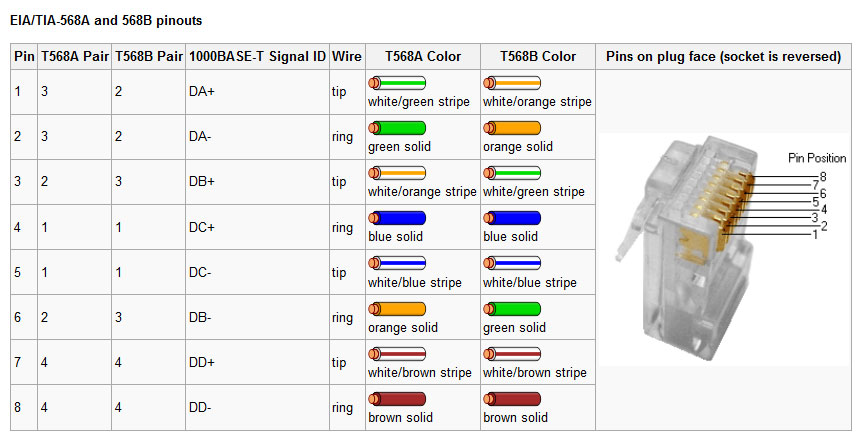
EIA/TIA 568a and b ethernet cable standard

Standard networking connectors for Ethernet connections. Rumor has it that only the “A” standard is accepted for government work and the “B” standard is being depreciated.

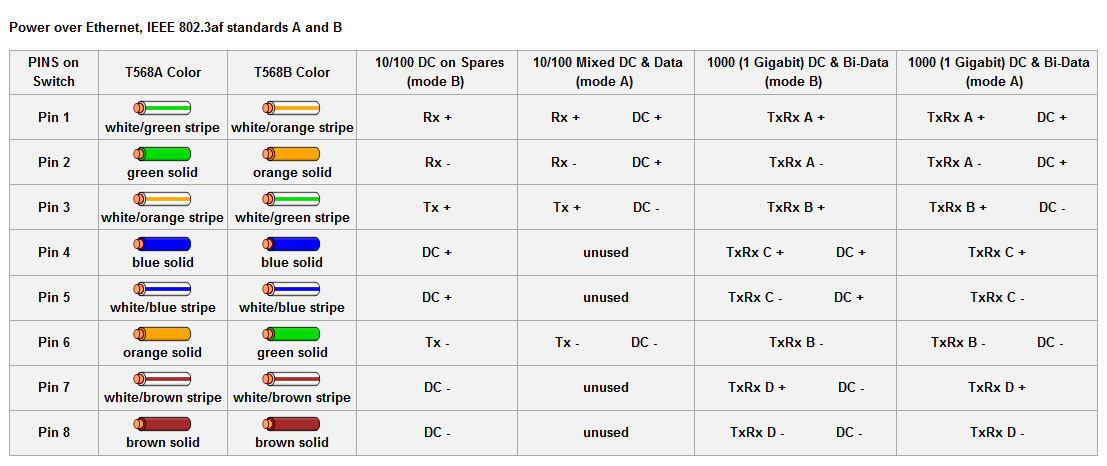
803.3af Power over Ethernet, imposed on EIA/TIA 568 a and b

Power over Ethernet pinouts. More and more commonly used in VOIP phone systems, but can also be found in wireless access points and other things of that nature.

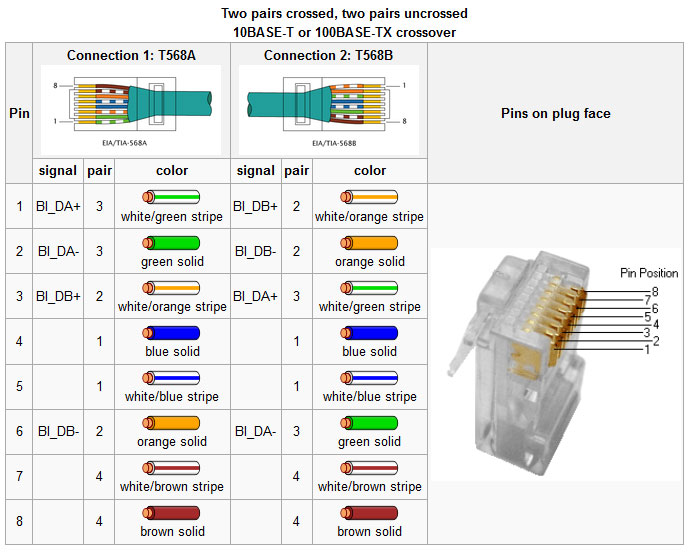
10/100 base T cross over cable
10/100 base T cross-over cable

Ethernet crossover cables are useful for connecting to similar pieces of equipment together, e.g. a computer to a computer, or a switch to a switch. Many new switches have port sensing, which will automatically cross the connection if a straight through cable is used.  Others have a specific port or a switch for a specific port which will cross over the cable.  Gigabit Ethernet uses all four pairs, thus a 1000 base T crossover looks a little bit different.

10/100/1000 base T Ethernet crossover cable

This type cable is backwards compatible with 10/100 base T systems.

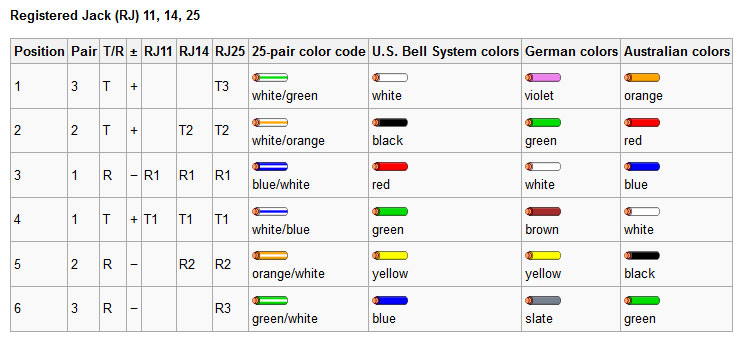
Registered Jack 11/14/25

Telephone system equipment jacks.

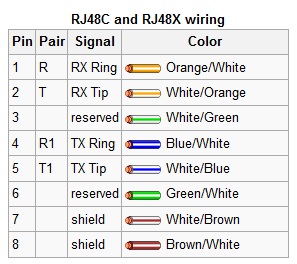
Registered Jack (RJ) 48, commonly used on T-1 and ISDN circuits

RJ48 and 48X used on T-1 (DS-1) and ISDN connections.  Since BRI and PRI ISDN are two wire circuits, the active pins are 4/5, which is the same as an RJ11.  I have often used RJ11 jacks for ISDN and found no issues with doing so.

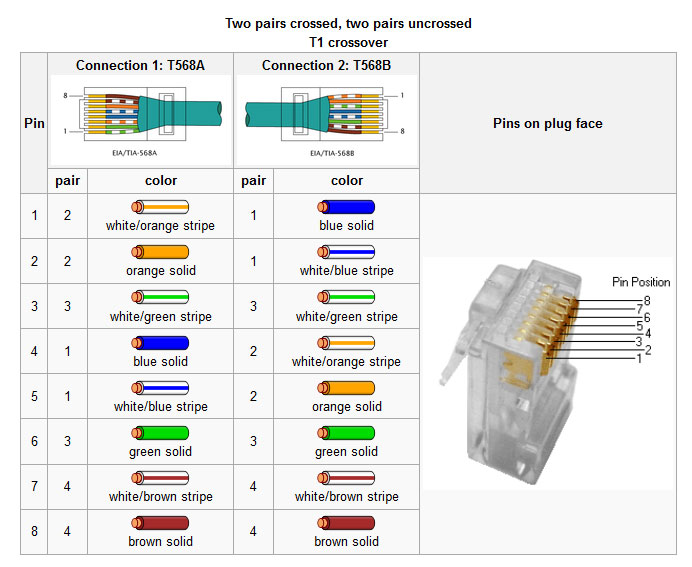
T-1 (DS-1, DSX-1) crossover cable

Crossover cable for T-1 (DS-1 or DSX-1 interface). Note, this is different from an Ethernet crossover cable, which will not work for in a DS-1 interface.  A T-1 loopback connector goes from pin 1 to pin 4 and pin 2 to pin 5 on a 8P8C connector.

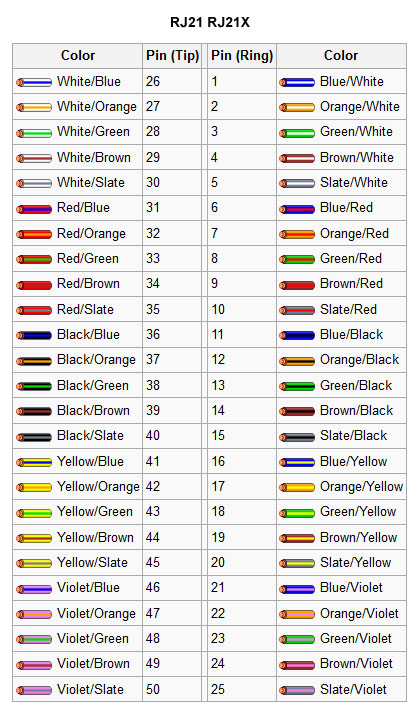
RJ21 and 21X color code.

RJ21 and 21X connectors are often found on the side of punch blocks and make for quick connections on cabling trunks.

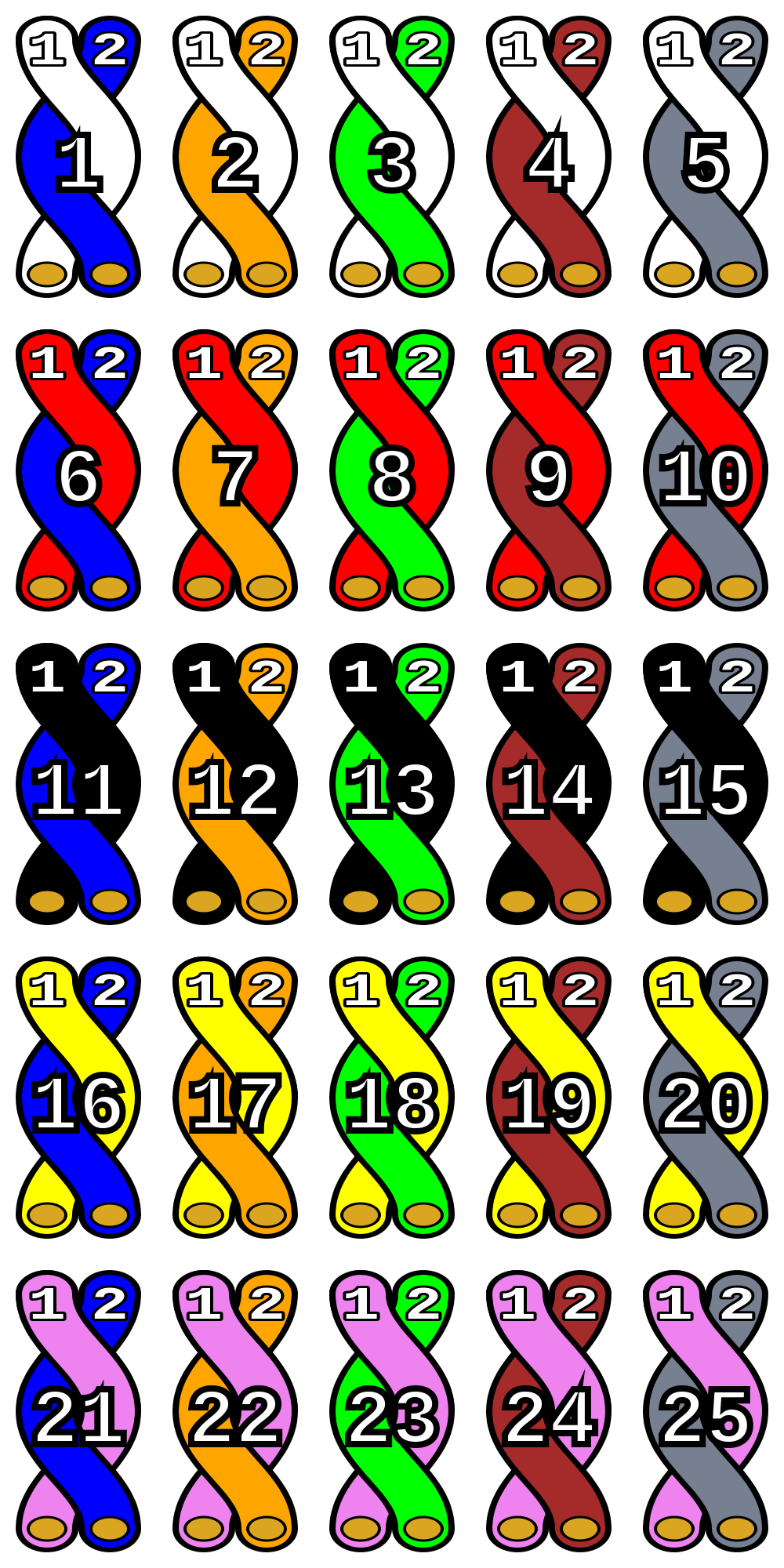
25 pair color code
25 pair color code

The generic 25 pair color code, which is always a good thing to have.

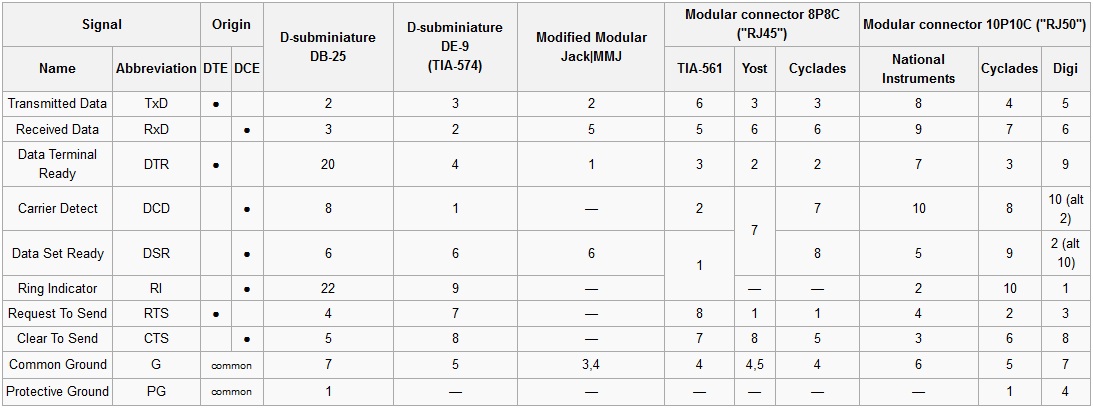
RS-232 data pins out for various connectors

RS-232 is still commonly used for data transfer in broadcast facilities. RS-485 is also used, however, that standard is often used with screw terminals or some other generic connection.

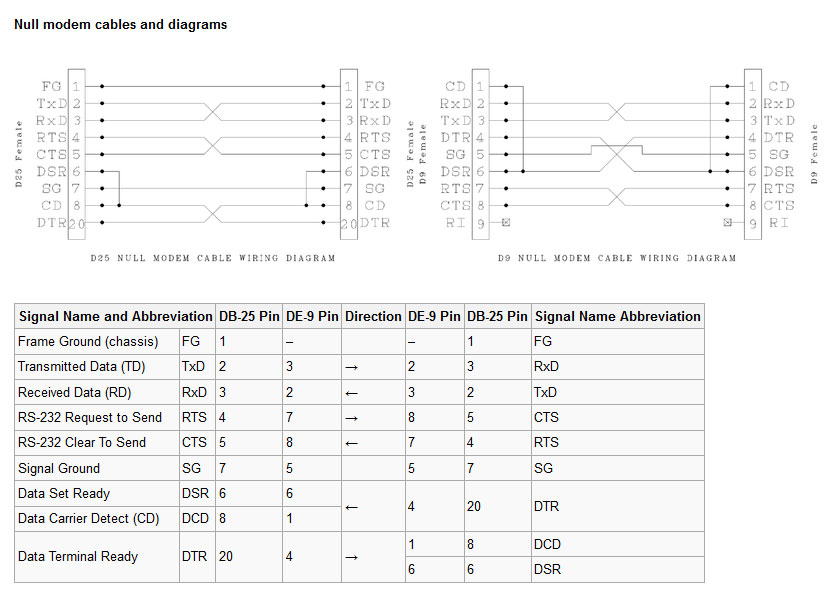
Null modems, cables and pinouts

Null modems for connecting equipment together and testing.

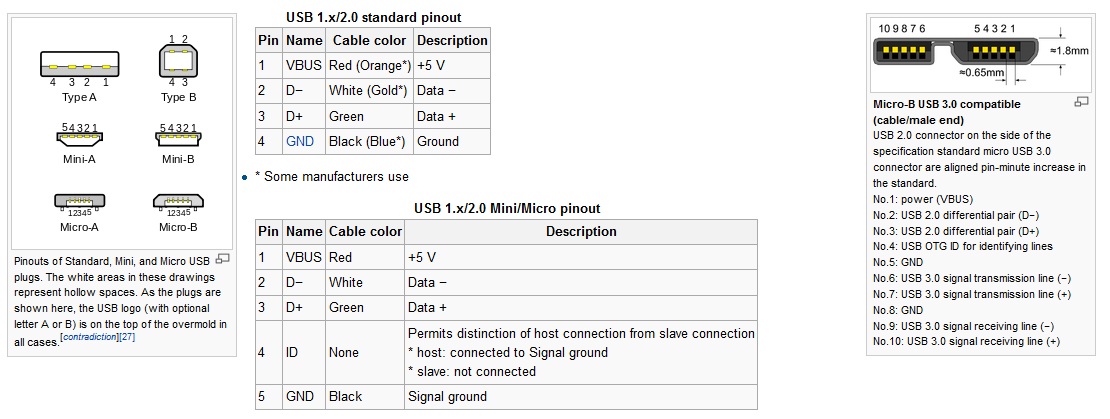
Universal Serial Buss (USB) connections and pinouts

Various USB connectors and pinouts. USB has replaced RS-232 data ports on most newer computers.

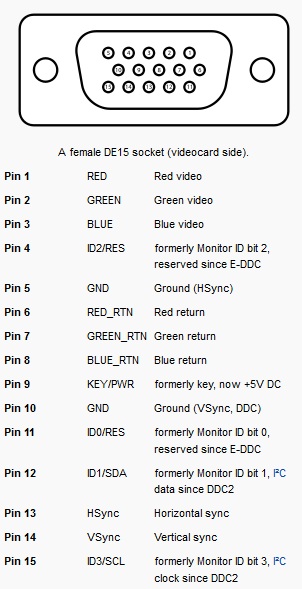
VGA connector and pinout

Computer graphics card pinouts.

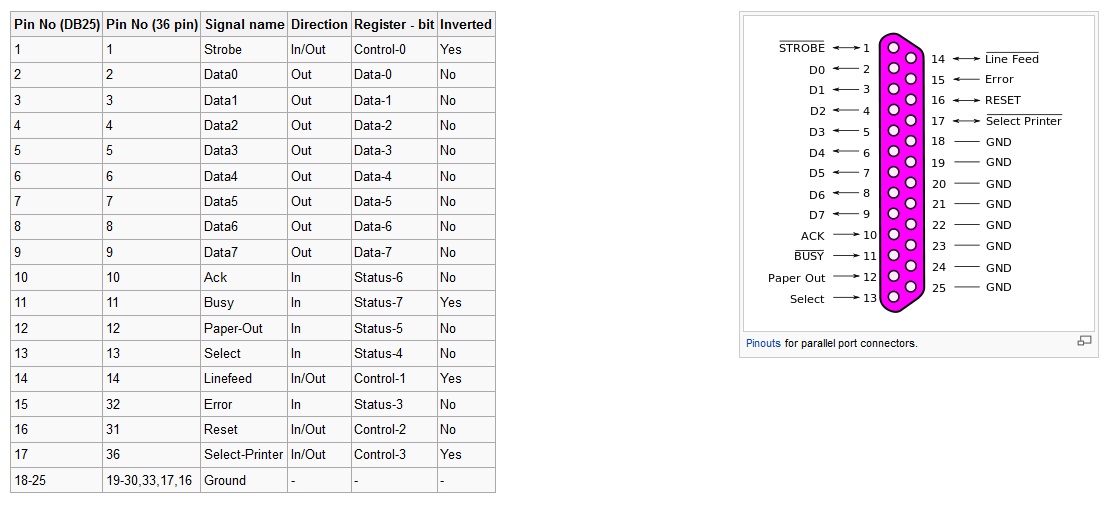
Computer Parallel port pinout

Computer parallel port pinout, not used very much anymore, replace by mostly USB devices. Can also be used as a limited GPI/GPO interface.  Some small automation software programs use pins 10,11,12,13 and 15 for closure information and pins 1, 14, 16, and 17 for output switching, machine starts and the like.

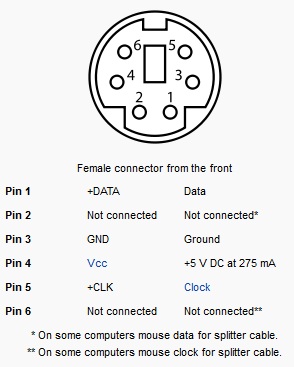
PS2 mouse and keyboard connector

PS2 mouse and keyboard connectors, again, replaced by USB but still found on older motherboards.

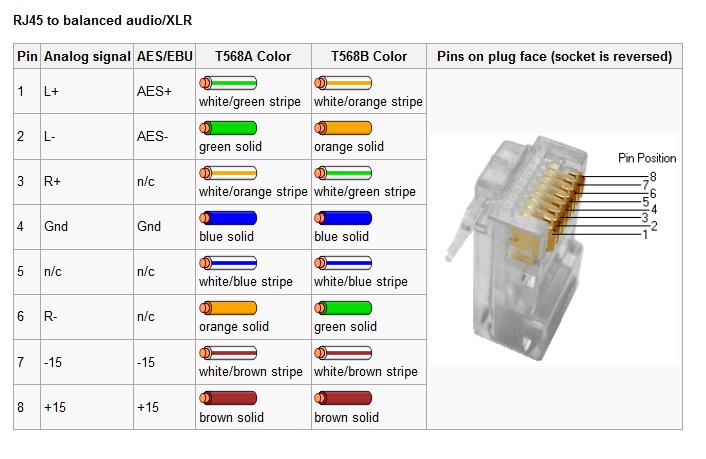
RJ-45 to balanced analog and digital audio

RJ-45 to balanced audio. This is a fairly standardized audio application for RJ-45 connectors developed by Radio Systems/Studio Hub. It is also used by Telos/Axia and Wheatstone, although often the +/- 15 VDC power is not included.

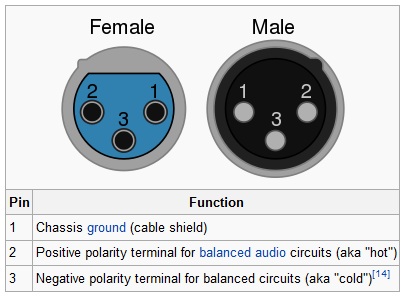
XLR connectors, old technology, still used

The ubiquitous XLR connector, still used for analog audio and also AES/EBU digital audio.

Series surge suppressor

Radio facilities, particularly mountaintop transmitter sites, are prone to power transients. The causes can be varied, but most often, lightning is the culprit.  Long power transmission lines to the site are vulnerable to direct strikes and EMF-induced spikes from nearby strikes.  Other issues, such as switching transients, load fluctuations, and malfunctioning equipment can lead “clear weather” outages.  Of course, the best way to deal with such things is through prevention.

Power line surge suppressors have been around for quite some time.  They usually take the form of a MOV (Metal Oxide Varistor) connected between the hot leg and neutral or ground.  There are a few differences in designs, however.  Typically, most facilities employ a parallel surge suppressor.  That normally takes to form of an enclosure hung next to the main power panel with a group of MOV modules in it.  The MOVs are fed from a circuit breaker in the panel.  Like this:

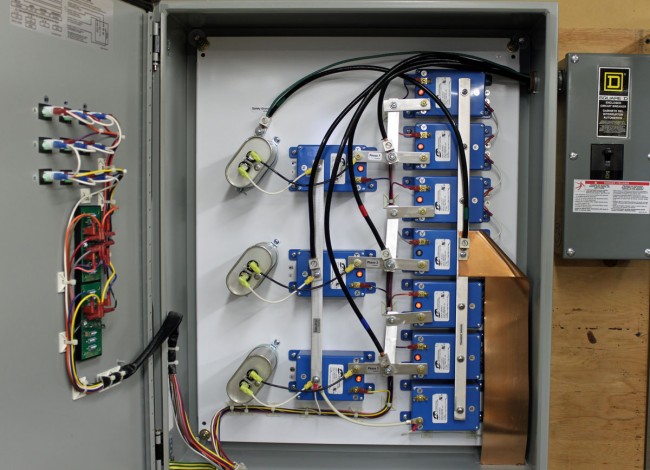
LEA parallel surge suppressor
LEA parallel or shunt surge suppressor

This is an LEA three-phase 208-volt shunt surge suppression unit, which has MOVs between all phases to ground and each other.  That is connected in parallel to the electrical service with the circuit breaker disconnect.  These function well enough, provided there is a good bit of series inductance before the unit and also, preferably after.  The series inductance can come from many sources, including long secondary leads from the utility company transformer or electrical conductors enclosed in metal conduit, particularly rigid (verses EMT, or FMC) metal conduit.  The inductance adds a bit of resistance to the transient voltages, which come in higher than 50 or 60 Hz AC waveform.

A better method of transient protection is the Series Surge Suppressor.  These units are installed in line with the incoming service and include an inductor to add the required series resistance coupled with MOVs and capacitors.  Most series surge suppressors also filter out harmonics and RF by design, something desirable, particularly at a transmitter site.  Series surge suppressors look like this:

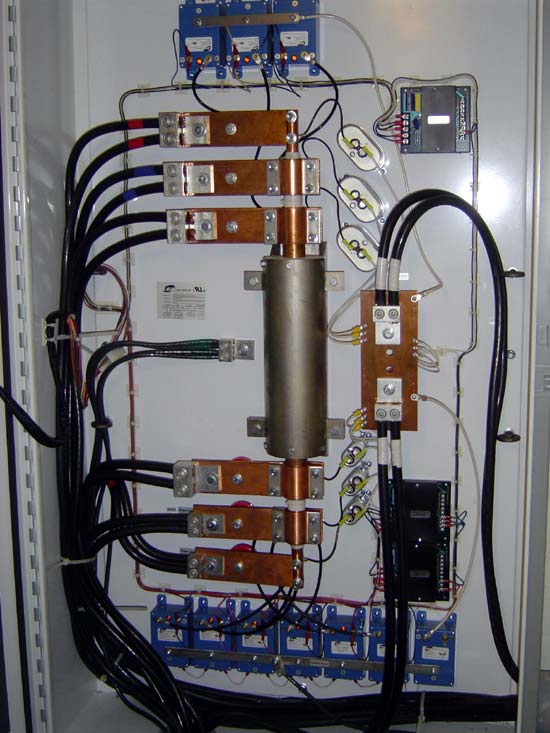
LEA DYNA systems series surge protector

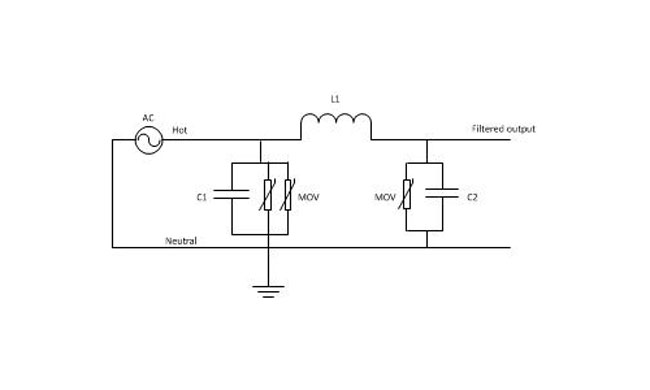
This is an LEA three-phase 240-volt unit.  As in the other example, all phases have MOVs to neutral and each other.   There are MOVs and capacitors on the line and load side of this unit (the line side is the bottom of the inductor).  A basic schematic looks like this:

Series surge suppressor basic schematic

A few things to note; MOVs have a short circuit failure mode and must be fused to protect the incoming line from shorts to the ground.  MOVs also deteriorate with age, the more they fire, the lower the breakdown voltage becomes.  Eventually, they will begin to conduct current at all times and heat up, thus they should also be thermally fused.  MOVs that are not properly protected from overcurrent or over-temperature conditions have the alarming capacity to explode and/or catch on fire.  From experience, this is something to be avoided.  Matched MOVs can be paralleled to increase current handling capacity.

The inductor is in the 100 µH range, which adds almost no inductive reactance at 60 Hz.  However, it becomes more resistive as the frequency goes up.  Most transients, especially lightning, happen at many times the 60 Hz fundamental frequency used in power distribution (50 Hz elsewhere unless airborne, then it may be 400 Hz).

Capacitors are in the 1-10 mF range and rated for 1 KV or greater as a safety factor.  The net effect of adding capacitance is to create a low-pass filter.  Hypothetically speaking, of course, playing around with the capacitance values may net a better lowpass filter.  For example, at 100 uH and 5 mF, the cutoff frequency is 225 Hz, or below the fourth harmonic.  Care must be taken not to affect or distort the 60 Hz waveform or all sorts of bad things will happen, especially to switching power supplies.

These units also need to have a bypass method installed.  If one of the MOV modules needs to be replaced, power to the unit has to be secured.  This can be done by connecting it to the AC mains before any generator transfer switch.  That way, the main power can be secured and the site can run on generator power while the maintenance on the surge suppression unit is taking place.

Subnetting 101

More information on IP networking:

Most radio station networks that I have seen are divided along several different lines based on functions.  These functions are:

  • Office network; E-mail, document storage and retrieval, printing, applications like traffic and billing, promotions, music scheduling, and so on
  • Automation network; automation servers, workstations, and audio editing machines used in production
  • Audio over IP (AOIP) network; any AOIP consoles, devices, or STL equipment
  • Voice over IP (VOIP); telephone system
  • Wireless LAN; WLAN or WIFI

It is helpful, then, to segment the network into different broadcast domains to reduce the congestion on any one network.  That is where a good subnetting scheme can be beneficial.  Subnets segment the network into smaller parts, reducing the amount of broadcast traffic and increasing network speeds by reducing MAC table sizes, and thus switching and lookup times.  They also can secure certain areas of the network from the outside or other subnets, adding a level of security.  For example, it may not be a good idea for automation computers or AOIP consoles to have access to the internet.  Certain functions in routers and switches can be enabled for that added security.

It is also important to efficiently use IP addresses in a large organization where WANs are used.  The better the subnetting scheme, the easier it is to understand and the better it performs.   Avoiding or reducing discontiguous networks is key to efficient and speedy routing.   That is an important consideration where applications like AOIP and VOIP are concerned

To really understand subnetting, it must be broken down into fundamental parts.  This pertains to IPv4, which will likely remain in use for quite some time.  The big chart, class B networks:

3nd  octet4th octetCIDRDecimalWild cardHosts3rd Up bySubnets
0000000000000000/16255.255.0.00.0.255.25565,5342550
1000000000000000/17255.255.128.00.0.127.25532,7661282
1100000000000000/18255.255.192.00.0.63.25516,382644
1110000000000000/19255.255.224.00.0.31.2558,190328
1111000000000000/20255.255.240.00.0.15.2554,0941616
1111100000000000/21255.255.248.00.0.7.2552,046832
1111110000000000/22255.255.252.00.0.3.2551,022464
1111111000000000/23255.255.254.00.0.1.2555102128
1111111100000000/24255.255.255.00.0.0.2552541256

Class C networks

3rd octet4th octetCIDRDecimalWild cardHosts4th Up bySubnetsBSubnetsC
1111111100000000/24255.255.255.00.0.0.2552542552560
1111111110000000/25255.255.255.1280.0.0.1271261285122
1111111111000000/26255.255.255.1920.0.0.63626410244
1111111111100000/27255.255.255.2240.0.0.31303220488
1111111111110000/28255.255.255.2400.0.0.151416409616
1111111111111000/29255.255.255.2480.0.0.768819232
1111111111111100/30255.255.255.2520.0.0.3241638464
1111111111111110/31255.255.255.2540.0.0.102N/A 
1111111111111111/32255.255.255.2550.0.0.001N/A 

The terms “Class B” and “Class C” networks are outdated.  Basically, I broke the chart up along a classful boundary to make it easier to read.

An IP v4 address consists of four octets of binary data. A common example is 192.168.1.154, which in binary numbers looks like this: 11000000.10101000.00000001.11111110. It is converted to base ten numbers (dotted decimal) so that we humans can deal with it. A typical subnet mask seen in many office networks is 255.255.255.0, which in binary looks like this: 11111111.11111111.11111111.00000000.  When a router receives a packet, it does something called an “ANDing process.”  When a router ANDs, it overlays the subnet mask on the network address and uses the following function: 1+1 = 1, 1+0 = 0 and 0+0 = 0.  Thus, in the above example, a router AND would look like this:

Dotted DecimalBinary Octets
192 168 1 254
255 255 255 0
192 168 1 0
11000000 10101000 00000001 11111110
11111111 11111111 11111111 00000000
11000000 10101000 00000001 00000000

The subnet mask is telling the router to ignore the last octet, thus saving a bit of time and processing power.  It may seem very small and insignificant.  When considering that routers make sometimes hundreds or thousands of routing decisions in a second, even a small bit of work reduction adds up quickly.  Subnet masks allow routers to look at only the layer three network address, ignoring the host portion.  This takes advantage of IPs inherent hierarchical addressing system and speeds the process of routing to the proper destination.

Another way to look at it:

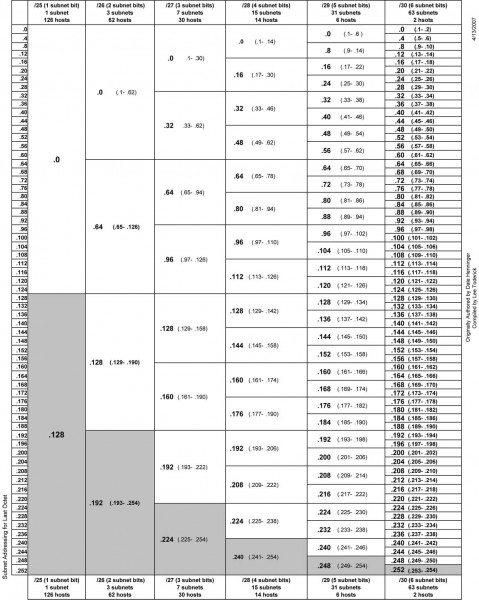
IPv4 subnet chart
IPv4 subnet chart, click for .pdf version

There are three IPv4 address ranges set aside for private (internal) use:

  • 192.168.0.0 to 192.168.255.255 /16
  • 172.16.0.0 to 172.31.255.255 /12
  • 10.0.0.0 to 10.255.255.255 /8

Thus, very large networks can use an internal IP address scheme in the 10.0.0.0 range and have up to 16,777,216 hosts, or 224 addresses minus two, one for the network line address and one for the broadcast address.  That would be one giant network clogged with ARP requests, ICMP packets and other miscellaneous multicast messages. A notation of /16 means that 16 bits are used for the network address, the remaining address bits are host bits.  A /24 network has 24 network bits and 8 host bits making the available hosts 254.

An example of an efficient network would be a medium market operation with six radio station under one roof.  This facility has ten studios and a newsroom using AOIP consoles, a VOIP phone system, an automation system, an office network with an internal file server and exchange server.  The number of required hosts on each subnetwork is

  • Office network, servers and wireless hosts: 78
  • VOIP phone system: 70
  • AOIP consoles and nodes: 30
  • Broadcast automation system: 22

Given IP address: 172.19.0.0 /22

In most instances, office networks are usually installed on one class C segment, that is to say, the network mask is 255.255.255.0.  However, in the example above, 254 hosts are not needed on the office network, thus it can be divided in half using the subnet mask of 255.255.255.128, leaving the other half for the VOIP phone system.  This subnetting scheme would leave 126 hosts on the office network and 126 hosts on the VOIP network.  The AOIP console and broadcast automation system can be placed on another class C segment, using the subnet mask of 255.255.255.192, which would give each subnet 62 hosts.  All subnets would have room to expand.  Each subnet is isolated from the others by a router.  The office subnet contains the gateway to the internet, usually .1 or .126 (first or last) IP address.

That would look something like this:

Office network
Line address First available Last available Broadcast Subnet mask
172.19.0.0 172.19.0.1 172.19.0.126 172.19.0.127 255.255.255.128
VOIP phone system
Line address First available Last available Broadcast Subnet mask
172.19.0.128 172.19.0.129 172.19.0.254 172.19.0.255 255.255.255.128
AOIP consoles and nodes
Line address First available Last available Broadcast Subnet mask
172.19.1.0 172.19.1.1 172.19.1.62 172.19.1.63 255.255.255.192
Broadcast Automation system
Line address First available Last available Broadcast Subnet mask
172.19.1.64 172.19.1.65 172.19.1.126 172.19.1.127 255.255.255.192

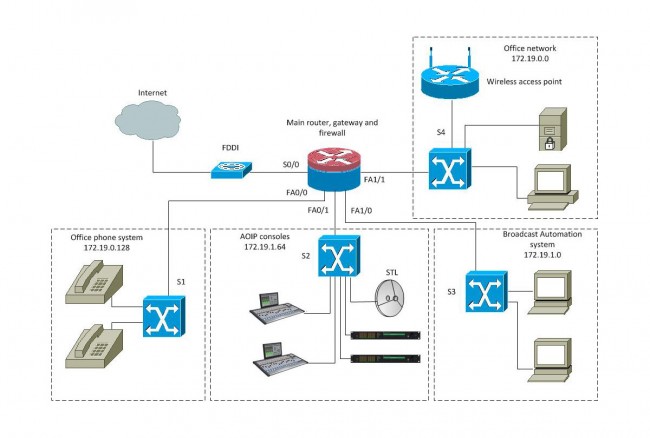
That keeps the network segments small but has room to grow.  This is a diagram of a converged network:

Radio Broadcast Facility converged network

With a setup like this, reliability is the key to a happy life. The router should be a good Cisco product with four or more Fast Ethernet ports. A second way to do this would be to have four routers plugged into a distribution switch and use OSPF to route between subnetworks. The switches should also be a good Cisco product, which can take advantage of port security options and QoS on the VOIP and AOIP segments.  VOIP systems usually require Power over Ethernet (POE) ports, thus that switch can be specialized for that purpose.

Many AOIP systems want to see Gigabit switches or at least Fast Ethernet switches with Gigabit or better backplanes.  Any AOIP STL system can be connected to the AOIP network along with other things like AOIP remote broadcast and studio telephone solutions.

Many WLAN access points can be configured as a network router and DHCP server for wireless hosts.

The largest users of the public (i.e. internet) network would be the VOIP phone system and office network.  The broadcast automation network may also be a if voice tracking or other program delivery over WAN is used.