Any radio station’s on air signal is its biggest marketing tool.
What sounds bad:
Over use of compression (gain reduction)
Over use of high frequency EQ
Over “equalization” on all frequencies
Over modulation
Overly aggressive composite clipping
Improper use of FM pre-emphasis
Poorly tuned transmitters (tube type)
Poorly matched antenna systems (all types)
Poor quality audio input
Over use of bit reduction on the STL
Analog STL’s that are off frequency
Playback of bad audio recordings
What sounds good:
Moderate use of compression to bring up audio levels for in car listening
Using equalization that suites format (e.g. more mid-range for all talk, more bass for urban, etc.)
Properly adjusted processor output levels for the correct modulation levels
Setting the pre-emphasis correctly
Tuning tube type transmitters for minimum distortion
Tuning antennas for adequate impedance and bandwidth
Making sure that audio input levels are correct, the audio is properly distributed and terminated with the correct impedance
Using STLs that have enough throughput that either no bit reduction or minimum bit reduction is used
Regularly check analog STL frequencies and re-adjust as necessary
Get rid of all bad audio recordings in the automation/playback system. Make sure that new files are from good sources and/or are re-recorded correctly
I took a little road trip between Christmas and New Years (Happy New Year!). I cannot help myself, I ended up tuning around the radio to see what was on. Suffice to say, I found the usual formats and a few locally focused stations. What struck me was the sound of some of the stations. While most sounded acceptable, if not somewhat generic, there were a few that had ear splitting, headache inducing audio. These stations were often over modulating and way over processed. It would have been better if there were no processing at all.
That got me thinking, what is or rather what should be the point of audio processing? Way back in the day, there were loudness wars. These were often program director ego induced efforts to sound louder than the competition because if you were louder, it meant you had more power. As listeners tuned their analog car radios from station to station, the signal that “jumped out” was mostly likely to attract more listeners. At least that was the way it was explained to me in the by a program director in the late 1980s.
We are no longer living in a listening environment where loudness is of huge importance. The number of audio sources has increased greatly; iTunes, Amazon Alexa, Spotify, Tune in, Pandora, YouTube Music, Sirius XM, iHeart, and AM/FM radio. Audio levels can be anywhere and listeners have gotten into the habit of raising or lower the volume as needed. Outside of program directors (or whatever they are called these days) offices, loudness means next to nothing. If you asked an average audio consumer how loud their program sounded, they would not likely know how to answer you.
I believe what most people are looking for is an enjoyable listening experience. The most important quality of any type of audio processing is that the product sounds good. The problem is “sounds good” is very subjective. Perhaps a better term would be technically sounds good. The audio should be free from distortion and artifacts of CODEC bit reduction. Overdone AAC or HE-AAC has this strange background swoshy platform behind everything which is headache inducing. Instruments should sound as they do when heard live. In other words, Susan Vega’s voice in the original Tom’s Diner should sound like Susan Vega.
Next would be compensating for difference levels in program material. A bit of gain reduction so that those in mobile listening environments can hear all of the program material. Finally, some format specific equalization can be useful. That is it. Moderate use of various audio processing tools can certainly accomplish those things. Like everything else, too much of a good thing is bad.
In the progression from Circuit Switched Data to Packet Switched Data, I can think of many different applications for something like this:
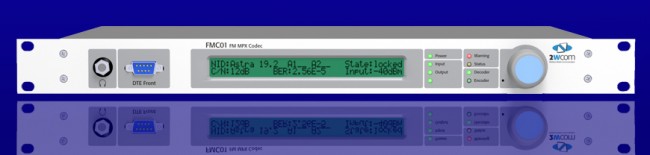
FMC01 MPX to IP CODEC
The FMC01 MPX to IP encoder can be used for multi-point distribution (multi-frequency or same-frequency network) of FM Composite audio, or as a backup solution over a LAN bridge, LAN extension, or public network. I can think of several advantages of using this for a backup when composite analog STLs are in use. There are many compelling reasons to extend the LAN to the transmitter site these days; Transmitter control and monitoring, security cameras, office phone system extensions, internet access, backup audio, etc. I would think, any type of critical infrastructure (e.g. STL) over a wireless IP LAN extension should be over a licensed system. In the United States, the 3.6 GHz WLAN (802.11y) requires coordination and licensing, however, the way the rules are set up, the licensing process is greatly simplified over FCC Part 74 or 101 applications.
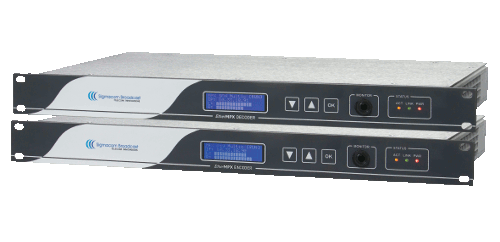
Another similar CODEC is the Sigmacom Broadcast EtherMPX.
Sigmacom Broadcast EtherMPX CODEC
Features include: • Transparent Analog or Digital MPX (MPX over AES), or two discrete L/R channels (analog or AES). • Built-in MPX SFN support with PTP sync (up to 6.000km in the basic version). No GPS receivers! • Unicast or Multicast operation to feed an unlimited number of FM transmitters with MPX from one encoder. • Linear uncompressed PCM 24-bit audio. • Very low audio latency: 2,5mS in MPX mode. • Perfect match with Sigmacom DDS-30 Exciter with Digital MPX input. • Can be used with high-quality 802.11a/n Ethernet links. • DC coupled, balanced Analog inputs & outputs with -130dBc noise floor. • No modulation overshoots due to compression or AC capacitor coupling. • Decoder provides simultaneous Analog & Digital output for transmitter redundancy. • Aux RS232 serial transparent link, Studio to Transmitter. • Auto switchover to Analog input when Digital signal is lost. • Centralized remote control & management software
One last thought; separating the CODEC from the radio seems to be a good idea. It allows for greater flexibility and redundancy. Using an MPX-type STL allows sensitive air chain processing equipment to be installed at the studio instead of the transmitter site.
A little blast from the past. This was found in a transmitter manual at one of the sites we take care of:
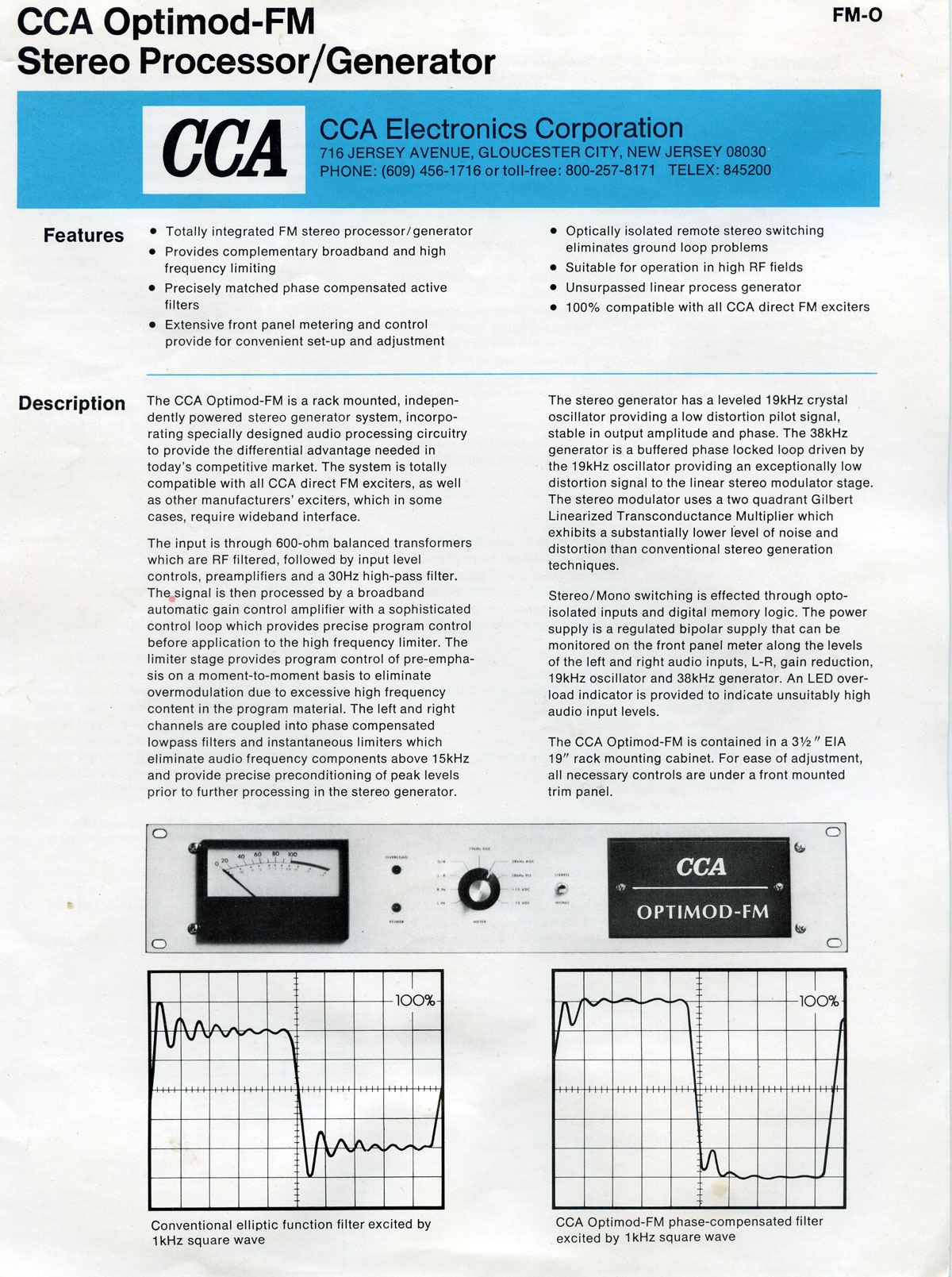
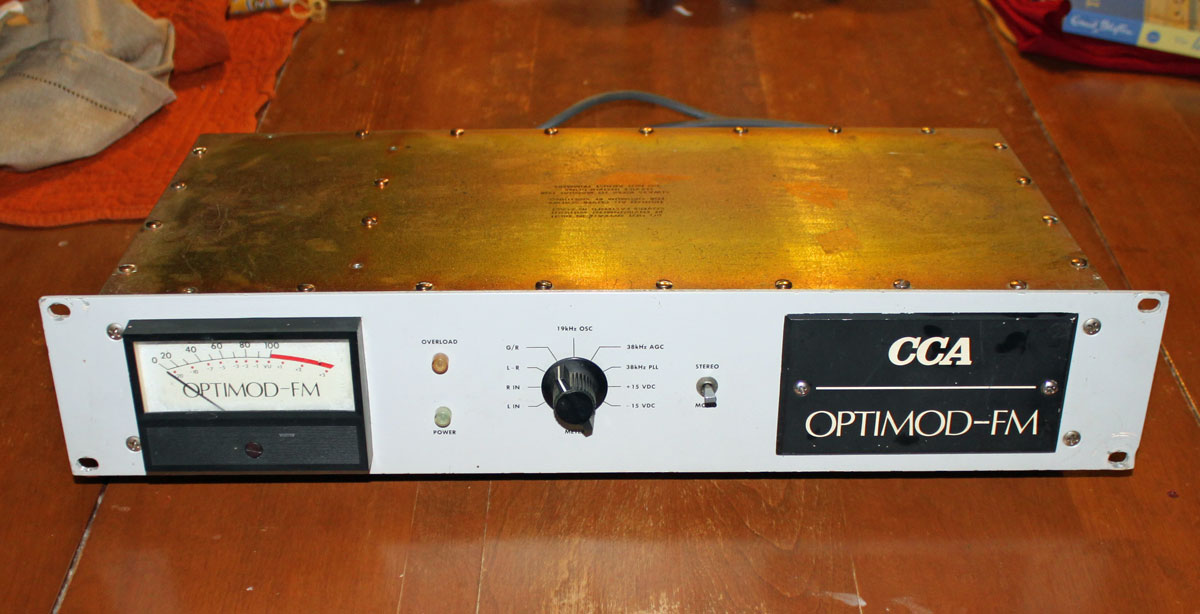
CCA Optomod 8000
I thought I would scan it and make it available here. As luck would have it, there is also a corresponding piece of equipment to go along with it. I had never seen a “CCA Optomod” (.pdf) before I was working at one of the radio stations in Trenton, Florida. This unit was rescued from under a pile of garbage out in the lawn shed. It was full of mud wasp nests and mouse droppings. Needless to say, it required a bit of TLC to return it to operation. I replaced the electrolytics, cleaned it up, and ran some audio through it. It is probably as good as the day it left the factory. Bob Orban made some really good stuff in his day.
CCA Optomod 8000
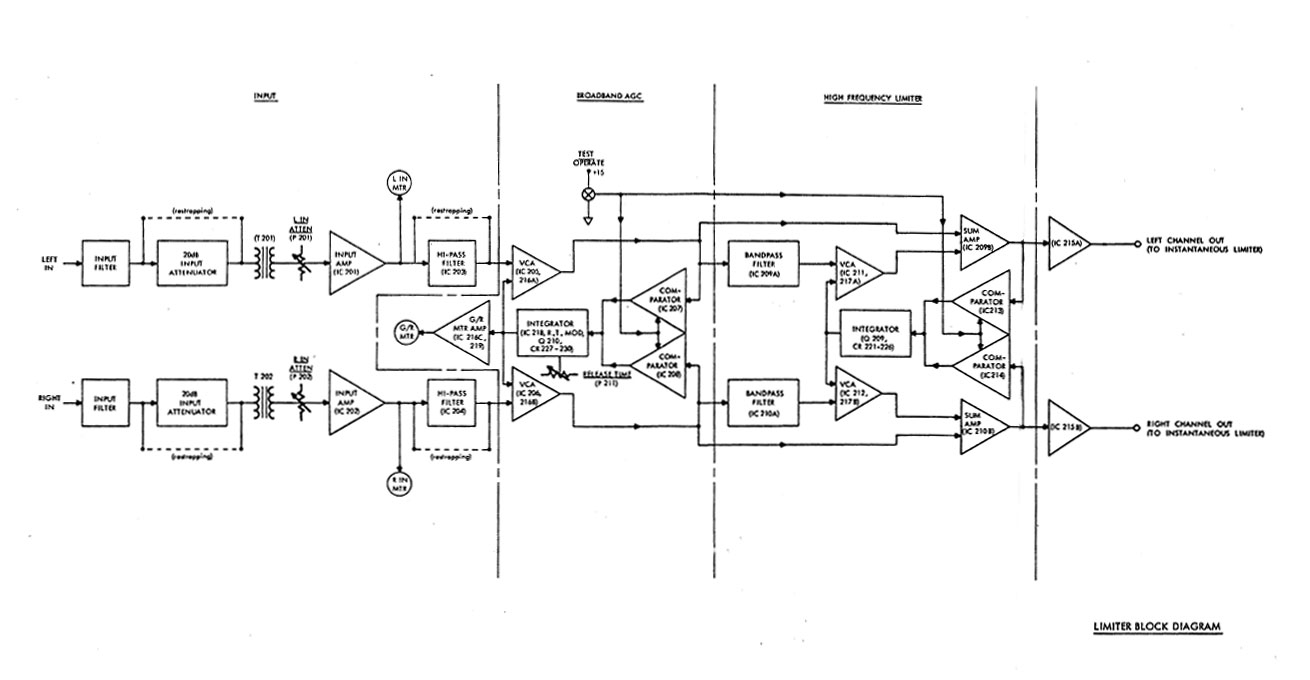
The original Optomod 8000 was an evolutionary design that made FM radio processing what it is today. The idea of combining broadband limiter, AGC and stereo generator in one box was a radical departure from the norm. The audio limiter functioned as a 15 KHz low pass filter and broadband AGC.
Orban Optomod 8000 audio limiter block diagram
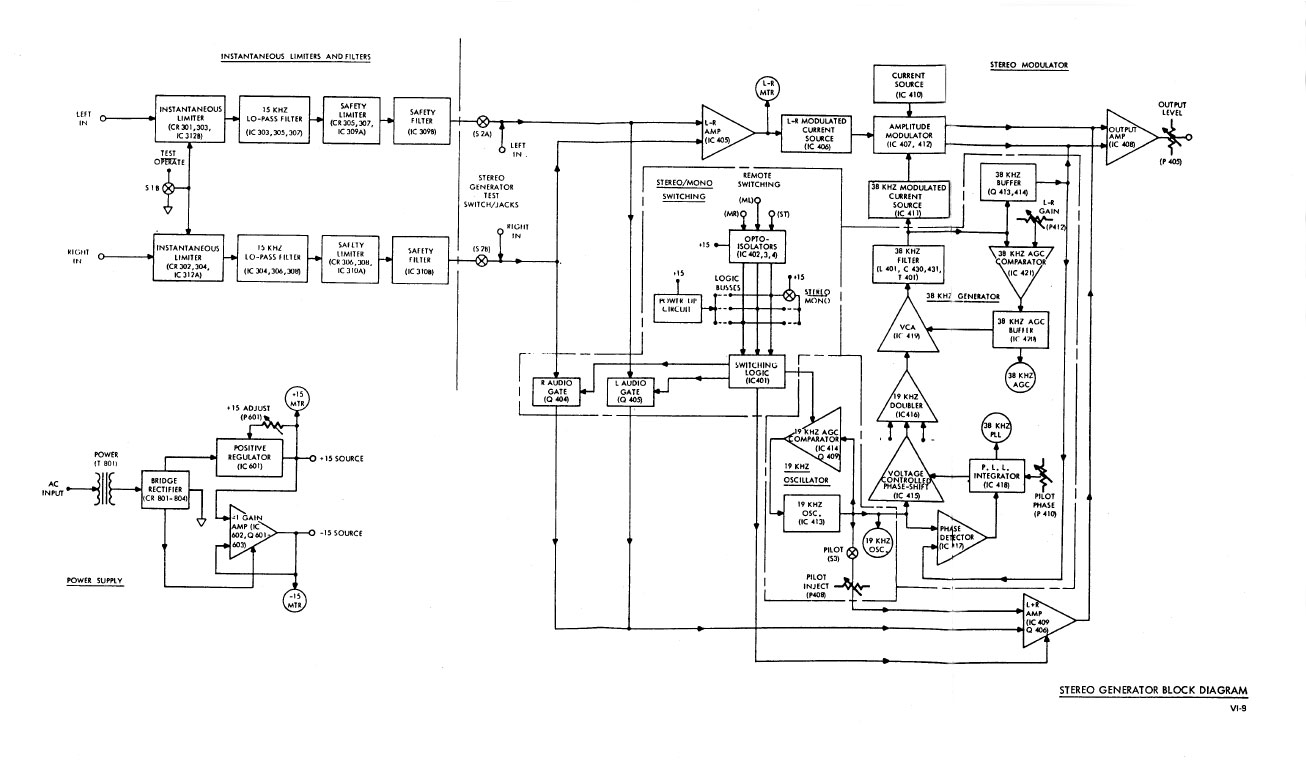
The stereo generator used very modest amounts of composite clipping to reduce overshoot and transients. Many people disparage composite clippers. If done correctly, it is transparent to the listener and increases perceived loudness by stripping off modulation product that is non-productive.
Orban Optomod 8000 Stereo Generator block diagram
Some thirty five or so years later, there are still many of these units in service in various stations around the world.
FM and AM broadcast radio processing has gone through many iterations. At first, the main processing function was to limit the input audio to a transmitter and prevent over-modulation. This was a particular problem with early tube-type AM transmitters, where over-modulation could create power supply overloads and kill the carrier while engineers scrambled around resetting things and hopefully pressing various buttons to get the transmitter back on the air.
Over the years, processors incorporated not just limiting, but compression, gating, equalization, clipping, and so on all in an effort to keep ahead or at least abreast of the station across town.
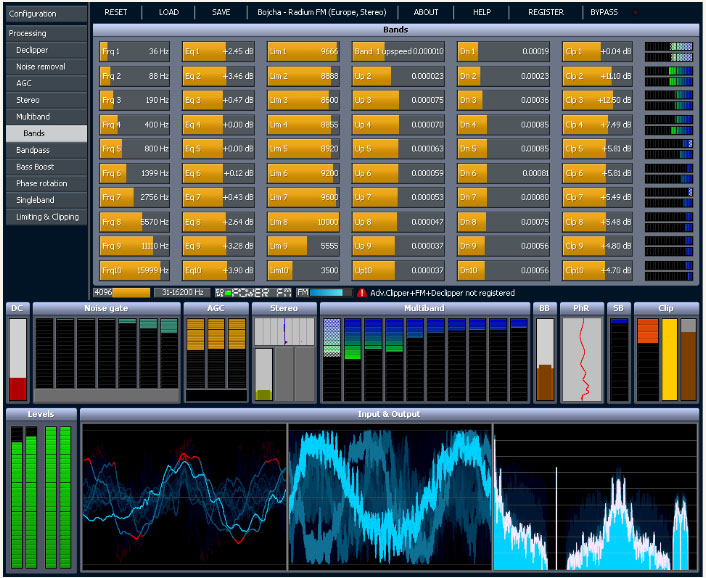
Today, broadcast air chain processors come in all shapes and flavors. In addition to that, internet streaming stations have their own unique set of issues to deal with. The top-of-the-line Telos Omina or Orban Optomod systems are great, however, they can set one back a pretty large sum of money. Enter then, the Stereo Tool PC based software processing program.
Stereo Tool sofware screen shot
The first difference between, say the Omina and Stereo Tool is the end user decides the hardware and basic operating system. The second difference is Stereo Tool comes with a free trial. Then there is the price difference, which ranges from about $48.00 US for the basic version, to $161.00 US for the basic FM version and finally $269.00 US for the full version (actual prices are in Euros, which will fluctuate day to day and the credit card company will likely charge an exchange fee). Add to that a medium-speed (2 Ghz) Intel Pentium4 or better computer, 1 Gb or more of RAM, good sound card and it all comes out to a reasonably priced audio processor.
Here are some of the specific features for broadcasting:
The idea of PC-based audio processing is new and interesting to most of us. The designer and owner of Stereo Tool, Hans van Zutphen, was nice enough to answer a few questions I posed to him via email:
PT: What prompted you to write audio processing software?
HvZ: Since I was very little I’ve always wanted to have my own radio station. I remember playing with walkie-talkies and trying to receive their sound on a real radio when I was about 8 or 9. I never really did anything with it until I found out in 2001 that you could easily start a webradio station – I actually found out because I was listening to a pirate station in my car which turned out to have a stream; within a week my own station was online.
Of course, I needed a bit of processing for it, and I wrote some command line tools – a single band compressor, a stereo-to-mono converter that didn’t cause any loss of audio (I was broadcasting hard trance on a mono 56 kbit/s stream, and this was the only way to get a decent sound out of it), and sometime later a multiband compressor.
In 2004 I left the company I worked for (ASML, they make machines to make computer chips, customers are companies like Intel, AMD etc.) to start working for Philips Healthcare, where I was going to work on image processing for X-Ray systems. I had 2 months of ‘spare time’ between those jobs, and I wanted to learn to program in Visual C++, so I decided to a GUI around my command line tools, and make a Winamp plugin out of it. I called it ‘Radio Tool’. I never really planned to do anything with it, it was just an exercise project.
About a year later I came across the Winamp site again and I saw that you could upload plugins. So I uploaded my program, now renamed to ‘Stereo Tool’ because a Google search for “Radio Tool” gave far too many hits. Within a week there were over 1000 downloads and a while later it surpassed 90,000. At that point I decided to create a new version, Stereo Tool 2.0.
For quite a while this remained a hobby project, I occasionally worked on it for a few months and then I wouldn’t look at it for months. But at some point I was approached by someone people who worked at a “real” (FM) Dutch radio stations who asked for some extra features – he couldn’t get the audio loud enough, and that’s how I got into clipping. Things started to get better, I learned more and more about processing, the number of downloads increased and people became more and more enthusiastic about it. At some point, after reading something about how an FM stereo signal looks, I thought it might be possible to output a stereo signal with a 192 kHz sound card, so I bought one and did some tests and it worked that same night, and within a few weeks I added RDS.
PT: Do you know, approximately, how many stations (AM/FM/internet) Stereo Tool is being used on?
HvZ: FM: About 500, ranging from small community and pirate stations up to large nation-wide stations which run Stereo Tool at a dozen transmitter sites. Streaming: Not sure, but definitely over 1,000, probably a lot more.
PT: I have read through the forums on your site, Stereo Tool looks like a very complete processing system. Any plans for new features, future upgrades, etc?
HvZ: Yes. I’m currently working on a new multiband compressor. The multiband compressor in Stereo Tool is still based on the code that I wrote in 2001 for my webradio station, which in turn was based on an even older version that I had used on 8-bit audio. It also has far too many bands. Because of this, the multiband compressor is currently the weak spot of Stereo Tool. In the last weeks, I have made a new single-band compressor that sounds a lot better, it actually outperforms other compressors I have tested, and I expect great results for the new multiband compressor, which will also have fewer bands. Something else that I’ve been planning for a long time is a composite clipper, which will add 1-2 dB of extra loudness and especially better highs. Stereo Tool can already be louder with good audio quality than nearly any hardware box on the market (see for example this video, Radio 538 uses an Orban 8600 http://www.youtube.com/watch?v=4VpfcqUPQys – unfortunately due to the mpeg compression it’s a bit difficult to compare but listen for distortion ) – but there’s always room for improvement.
PT: What are the advantages of a PC software-based processor vs. a hardware-based (e.g. Omni or Optomod)?
HvZ: Ah, good question. Not sure if it’s the right question… With processing, a lot of things come down to taste, and there are several stations that have replaced their hardware processing with Stereo Tool not because it’s software and PC based but because they preferred the audio that comes out of it. Stereo Tool is also one of only 2 processors that contain a de clipper (the other one is the Omnia 9, I licensed my de clipper to them). For a demo of the declipper see: http://www.youtube.com/watch?v=oqOljvx9KaM
Also, Stereo Tool contains a stereo and RDS coder, but most other processors don’t, so instead of having a whole bunch of devices everything can be done in a single PC, which also results in better quality. Recently I added a new feature that enables synchronizing multiple FM transmitter signals that all connect to a simple Shoutcast stream (video: http://www.youtube.com/watch?v=GYQ5CYs0ZX8 ), so you also don’t need any streaming hardware anymore.
Of course, there’s the price. A hardware box that gives “similar” quality (of course every processor sounds different, and it’s a matter of taste, so it’s difficult to compare, but I’m assuming that things like low volume levels, gain riding, distortion, and lack of clarity in the highs are bad) easily costs $10,000 or more. And you can always easily upgrade to new versions. If you already have a PC with enough spare processing power you don’t need to buy anything.
I know that some people at radio stations are ‘afraid’ of using a PC in their processing path, but based on feedback I get from the stations that run my software it’s completely stable – and of course, if a PC does break, you can replace it with any fast enough PC you have lying around – you just need to put the proper sound card in.
But for development, the advantages are huge. If you use DSPs, it’s usually a lot of work to even make a very small change. When I worked at Philips Healthcare, the image processing that had been done – without many changes – on DSPs for many years was being converted to PCs because of the speed of development and the price of hardware. Once the conversion was finished, the development speed increased dramatically and 2 years later the image quality had improved beyond anything that was imaginable with DSPs. PCs get faster every year, and you don’t have to do anything for that – for the same price the processing power that you can buy roughly doubles every 1.5 years, and if you pay more you can get even more. If you use DSPs, you have to do a lot of work yourself, you cannot just ‘buy a faster DSP’. Testing things is very easy, I can write some code that does something new, post it on my forum and I’ll have feedback from users the next morning – with DSP that’s a LOT more difficult and it takes a lot more time. I’ve learned by now that everyone hears things in a different way, and occasionally there are groups of people who hear something they find very annoying while many other people (often including myself) don’t hear anything wrong with it at all. Especially in cases like this, it’s really great to be able to quickly send new versions to several people all around the world for testing.
PT: Are there any particular sound cards that work better with Stereo Tool?
HvZ: Yes. For the best results, use the Marian Trace Alpha, with the ESI Juli@ as the second-best choice (it needs calibration).
Thank you very much, Hans, for the interesting insight.
Check out the videos, especially the de clipper video, which is quite amazing. That will clean up all but the most ham-handed DJ mistakes.
PC-based audio processing software is a great solution station on a limited budget that cannot afford high-end air chain processors. There are many LPFM’s, Part 15 stations, and others that can get great-sounding audio and RDS for a very reasonable price. Currently, the AM settings do not allow asymmetrical modulation, which is more of a US thing. There is some talk of adding it in a later update.