The Ground Loop

Audio Engineers will know this subject well.  Grounding has many purposes, including electrical safety, lightning protection, RF shielding, and audio noise mitigation.  Although all types of grounds are related in that they are designed to conduct stray electrons to a safe place to be dissipated, the designs of each type are somewhat different.  What might be an excellent audio ground may not be the best lightning ground and vice versa.  Sometimes good audio grounds can lead to stray RF pickup.

The basic ground loop looks something like this:

Ground Loop schematic

Where RG should equal zero, in this representation it is some other resistance.  This causes a different potential on the circuit (V1), which in turn causes current to flow (I1).  It is that unexpected flow of current that creates the problems, causing voltage (V2) to be induced on another part of the circuit.  In cabling applications, this will result in a loud, usually 60-cycle hum impressed on the audio or video being transmitted through the cable.

The resistance can come from something as mundane as the length of the conductor going to ground. This can often happen when using shielded audio wire in installations when the connected equipment is already grounded through the electrical plug.

There are two proven methods for eliminating ground loops, both of which are best implemented in the design phase of construction (aren’t most things).
Radio Station Common Point Grounding

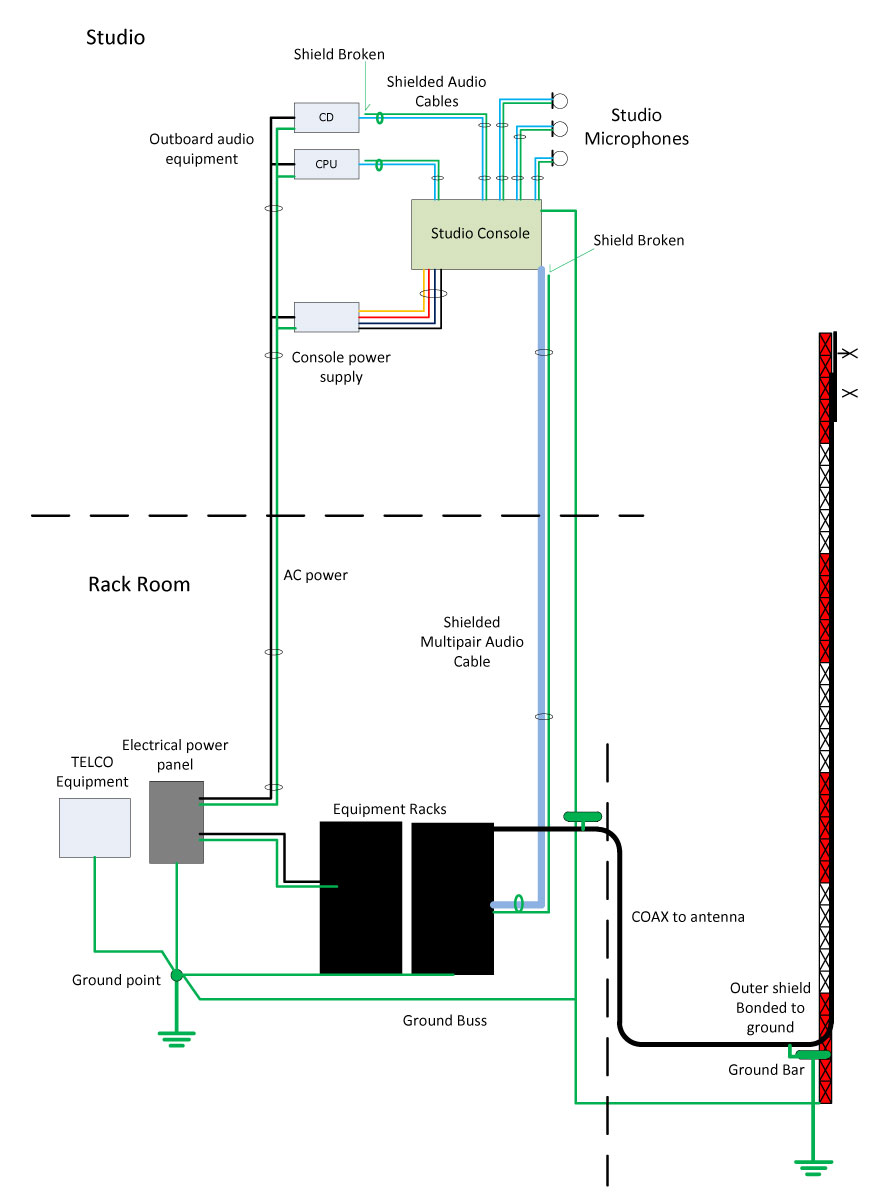
The first is a single ground point topology, also known as a common point or star grounding system.  A common ground system consists of one grounding point or buss bonded together so that it has the same potential.  All grounded equipment is then connected to that point creating a single path to ground.  All modern electrical equipment has a path to ground via the third prong of its electrical cord.  Problems can or will occur when audio equipment is plugged into separate AC circuits, grounded via the electrical plug, and then tied together via an audio ground.  The longer the separate grounding paths, the more severe 60 cycle (or some harmonic thereof) hum can result.

To eliminate this problem, the shields should be broken at one end of the audio cable.  Never cut the third prong off of an electric cord, which can create another problem called electrocution.  Given the choice between a ground loop and electrocution, I’d stay away from electrocution, mine or somebody else’s.

For installations in high RF fields, the open shield or ground drain can act like an antenna.  In those situations, the open end can be bypassed to ground using a 0.01 uf ceramic disk capacitor. Electrically, this will look like an open at DC or 60 cycles, but allow stray RF a path to ground.   This problem can be a common occurrence when studios are co-located with transmitters.
Differential Signaling

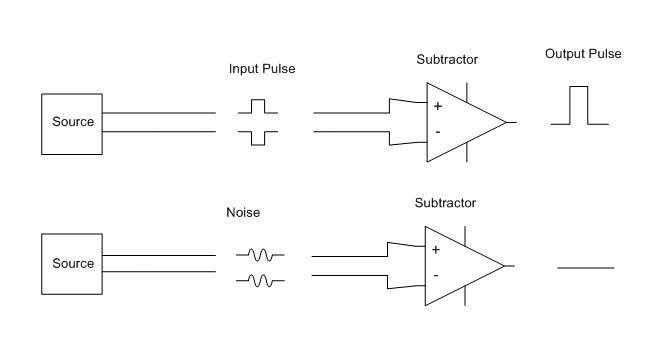
The second is by using balanced audio or differential signals as much as possible.  This poses a problem for those stations that use consumer grade components, especially in high RF fields.  For shorter cable lengths, two or three feet, it is usually not a problem.  Anything beyond that, however, and trouble awaits.

It is relatively easy and inexpensive to convert audio from unbalanced to balanced.  As much as possible, equipment and sound cards that have balanced audio inputs and outputs should be used. In the end, it will simply sound better to use higher quality equipment.  Also, longer cable runs need to be properly terminated at both ends.

Installing equipment using good engineering principles and techniques will eliminate these problems before they start.
They do it a little differently in Europe

Old world and all that.  I am of the impression that European broadcast engineers are a more studied lot.  Their process involves much more deliberation, thoughtful analysis, and planning than ours does.  For example, when it comes to station loudness, most programmers and many engineers (myself not included) to do more is better.  It is thus that we get the Omina 11 and other audio squashers.

The EBU technical group takes a different approach:

EBU R128 (ed: Loudness Recommendation) is the result of two years of intense work by the audio experts in the EBU PLOUD Group

Aside from the above-mentioned EBU R128, there are four technical papers dealing with implementation, meters, distribution, and so on.  The body of work is a recommendation, not a requirement.  I can’t imagine the voluntary implementation of something like this in the US.  Even so, there are advantages to having a single acceptable level of programming audio.  It is interesting reading.

Sound Cards for Broadcast Use

Computer audio sound cards are the norm at nearly all radio stations. I often wonder, am I using the best audio quality sound card?  There are some trade-offs on the quality vs. cost curve.  At the expensive end of the curve, one can spend a lot of money on an excellent sound card.  The question is, is it worth it?  The laws of diminishing returns state: No.  High-quality reproduction audio can be obtained for a reasonable price.  The one possible exception to that rule would be production studios, especially where music mix-downs occur.

I would establish the basic requirement for a professional sound card is balanced audio in and out, either analog, digital, or preferably, both.  Almost all sound cards work on PCI bus architecture, some are available with PCMCIA (laptop) or USB.  For permanent installations, an internal PCI bus card is preferred.

Keeping an apples: apples comparison, this comparison it limited to PCI bus, stereo input/output, and analog and digital balanced audio units for general use.  Manufacturers of these cards often have other units with a higher number of input/output combinations if that is desired.   There are several cards to choose from:

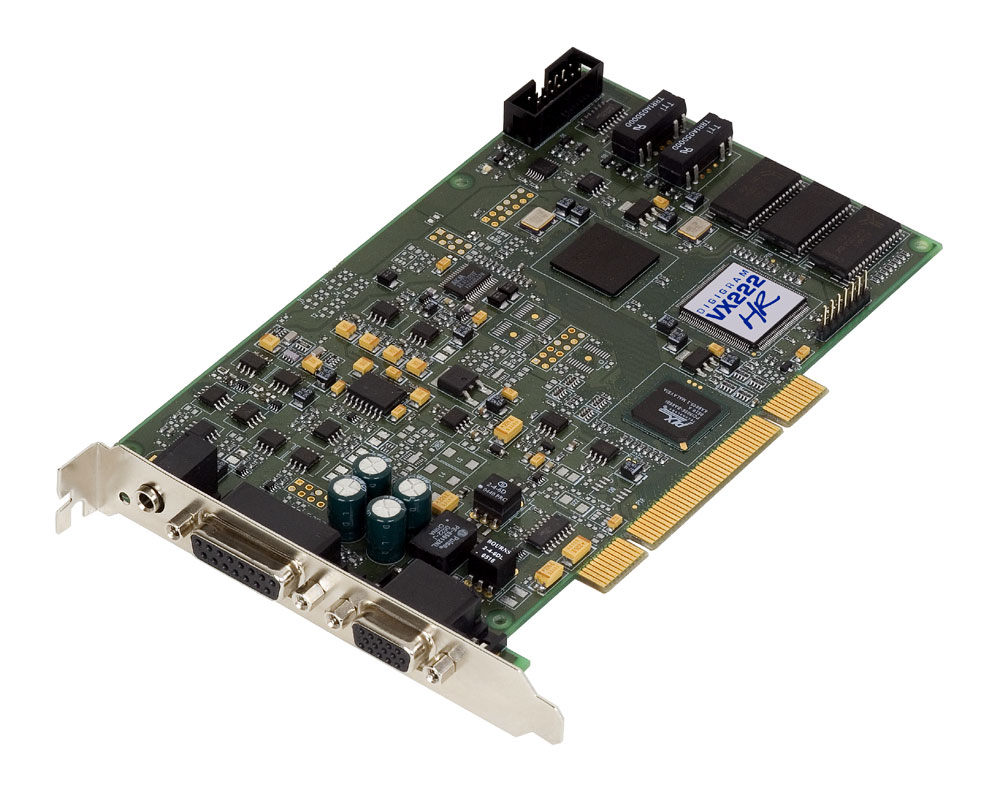
The first and preferred general all-around sound card that I use is the Digigram VX222HR series.   This is a mid-price range PCI card, running about $525.00 per copy.

Digigram VX222HR professional sound card

These are the cards preferred by BE Audiovault, ENCO, and others. I have found them to be easy to install with copious documentation and driver downloads available online.  The VX series cards are available in 2, 4, 8, or 12 input/output configurations.  The HR suffix stands for “High Resolution,” which indicates a 192 KHz sample rate.  This card is capable of generating baseband composite audio, including RDS and subcarriers, with a program like Breakaway Broadcast.

Quick Specs:

  • 2/2 balanced analog and digital AES/EBU I/Os
  • A comprehensive set of drivers: driver for the Digigram SDK, as well as low-latency WDM DirectSound, ASIO, and Wave drivers
  • 32-bit/66 MHz PCI Master mode, PCI and PCI-X compatible interface
  • 24-bit/192 kHz converters
  • LTC input and inter-board Sync
  • Windows 2003 server, 2008 server, Seven, Eight, Vista, XP (32 and 64 bit), ALSA (Linux)
  • Hardware SRC on AES input and separate AES sync input (available on special request)

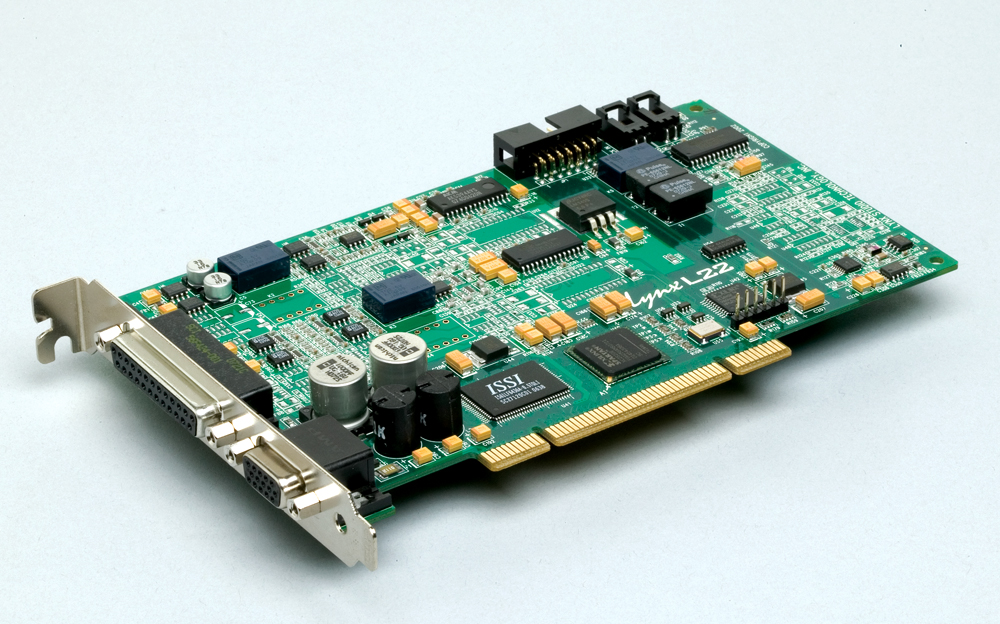
Next is the Lynx L22-PCI.  This card comes with a rudimentary 16-channel mixer program.  I have found them to be durable and slightly more flexible than the Digigram cards.  They run about $670.00 each.  Again, capable of a 192 KHz sample rate on the analog input/outputs.  Like Digigram, Lynx has several other sound cards with multiple inputs/outputs which are appropriate for broadcast applications.

Lynx L22-PCI professional sound card

Specifications:

  • 200kHz sample rate / 100kHz analog bandwidth (Supported with all drivers)
  • Two 24-bit balanced analog inputs and outputs
  • +4dBu or -10dBV line levels selectable per channel pair
  • 24-bit AES3 or S/PDIF I/O with full status and subcode support
  • Sample rate conversion on digital input
  • Non-audio digital I/O support for Dolby Digital® and HDCD
  • 32-channel / 32-bit digital mixer with 16 sub outputs
  • Multiple dither algorithms per channel
  • Word, 256 Word, 13.5MHz or 27MHz clock sync
  • The extremely low-jitter tunable sample clock generator
  • Dedicated clock frequency diagnostic hardware
  • Multiple-board audio data routing and sync
  • Two LStream™ ports support 8 additional I/O channels each
  • Compatible with LStream modules for ADAT and AES/EBU standards
  • Zero-wait state, 16-channel, scatter-gather DMA engine
  • Windows 2000/XP/XPx64/Seven/Eight/Vista/Vistax64: MME, ASIO 2.0, WDM, DirectSound, Direct Kernel Streaming and GSIF
  • Macintosh OSX: CoreAudio (10.4)
  • Linux, FreeBSD: OSS
  • RoHS Compliant
  • Optional LStream Expansion Module LS-ADAT: provides sixteen-channel 24-bit ADAT optical I/O (Internal)
  • Optional LStream Expansion Module LS-AES: provides eight-channel 24-bit/96kHz AES/EBU or S/PDIF digital I/O (Internal)

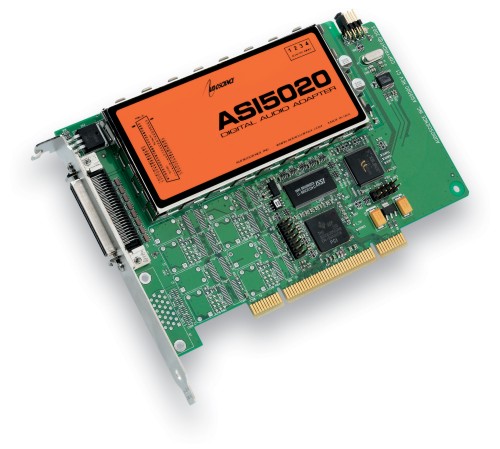
Audio Science makes several different sound cards, which are used in BSI and others in automation systems.  These cards run about $675 each.

Audio Science ASI 5020 professional sound card

Specifications:

  • 6 stereo streams of playback into 2 stereo outputs
  • 4 stereo streams of record from 2 stereo inputs
  • PCM format with sample rates to 192kHz
  • Balanced stereo analog I/O with levels to +24dBu
  • 24bit ADC and DAC with 110dB DNR and 0.0015% THD+N
  • SoundGuard™ transient voltage suppression on all I/O
  • Short length PCI format (6.6 inches/168mm)
  • Up to 4 cards in one system
  • Windows 2000, XP and Linux software drivers available.

There are several other cards and card manufactures which do not use balanced audio.  These cards can be used with caution, but it is not recommended in high RF environments like transmitter sites or studios located at transmitter sites.  Appropriate measures for converting audio from balanced to unbalanced must be observed.

Further, there are many ethersound systems coming into the product pipeline which convert audio directly to TCP/IP for routing over an ethernet 802.x based network.  These systems are coming down in price and are being looked at more favorably by broadcast groups.  This is the future of broadcast audio.

Everything we do is destined for one place.

I give you, The Human Ear:

Anatomy of the human ear
Anatomy of the Human Ear, courtesy of Wikipedia

All of the programming elements, all of the engineering equipment and practices, all of the creative process, the music, the talk, the commercials, everything that goes out over the air should reach as many ears as possible.  That is the business of radio.  The quality of the sound and the listening experience is often lost in the process.

Unfortunately, a large segment of the population has been conditioned to accept the relatively low quality of .mp3 and other digital files delivered via computers and smartphones.  There is some hope however; when exposed to good-sounding audio, most people respond favorably, or are in fact, amazed that music can sound that good.

There are few fundamentals as important as sounding good.  Buying the latest Frank Foti creation and hitting preset #10 is all well and good, but what is it that you are really doing?

There was a time when the FCC required a full audio proof every year.  That meant dragging the audio test equipment out and running a full sweep of tones through the entire transmission system, usually late at night.  It was a great pain, however, it was also a good exercise in basic physics.  Understanding pre-emphasis and de-emphasis curves, how an STL system can add distortion and overshoot, how clean (distortion-wise) the output of the console is, how clean the transmitter modulator is, how to correct for base frequency tilt and high-frequency ringing, all of those are basic tenants of broadcast engineering.  Mostly today, those things are taken for granted or ignored.

Audio frequency vs. wavelength chart

Every ear is different and responds to sound slightly differently.  The frequencies and SPLs given here are averages, some people have hearing that can go far above or below average, however, they are an anomaly.

Understanding audio is a good start.  Audio is also known as sound pressure waves.  A speaker system generates areas or waves of lower and high pressure in the atmosphere.  The size of these waves depends on the frequency of vibration and the energy behind the vibrations.  Like radio, audio travels in a wave outward from its source, decreasing in density as a function of the area covered.  It is a logarithmic decay.

The human ear is optimized for hearing in the mid-range band around 3 KHz, slightly higher for women and lower for men.  This is because the ear canal is a 1/4 wavelength resonant at those frequencies.  Mid range is most associated with the human voice and the perceived loudness of program material.

Bass frequencies contain a lot of energy due to the longer wavelengths.  This energy is often transmitted into structural members without adding too much to the listening experience due to a sharp roll-off starting around 100 Hz.  Too much base energy in radio programming can sap loudness by reducing the midrange and high-frequency energy from the modulated product.

High frequencies offer directivity, as in left right stereo separation.  Too much high frequency sounds shrill and can adversely affect female listeners, as they are more sensitive to high-end audio because of smaller ear canals and tympanic membranes.

Processing programming material is a highly subjective matter.  I am a minimalist, I think that too much processing is self-defeating.  I have listened to a few radio stations that have given me a headache after 10 minutes or so.  Overly processed audio sounds splashy, contrived, and fake with unnatural sounds and separation.  A good idea is to understand each station’s processing goals.  A hip-hop or CHR station obviously is looking for something different than a classical music station.

For the non-engineer, there are three main effects of processing;  equalization, compression (AKA gain reduction), and expansion.  Then there are other things like phase rotation, pre-emphasis or de-emphasis, limiting, clipping, and harmonics.

EQ is a matter of taste, although it can be used to overcome some non-uniformity in STL paths.  Compression is a way to bring up quiet passages and increase sound density or loudness.  Multi-band compression is all the rage, it allows each of the four bands to react differently to program material, which can really make things sound differently than they were recorded. Miss-adjusting a multi-band compressor can make audio really sound bad.  Compression is dictated not only by the amount of gain reduction but also by the ratio, attack, and release times.  Limiting is relative to compression, but acts only on the highest peaks.  A certain amount of limiting is good as it acts to keep programming levels constant.  Clipping is a last resort method for keeping errant peaks from affecting modulation levels.  Expansion is often used on microphones and is a poor substitute for a well built quiet studio.  Expansion often adds swishing effects to microphones.

I may break down the effects of compression and EQ in a separate post.  The effects of odd and even order audio harmonics could easily fill a book.