No food or drink in the studio

This is a rule that I always find difficult to enforce.  Since switching into contracting mode, I am often at any particular studio once per week or less.  It seems to me, no matter what signs are posted or what words are spoken, the DJ seems to hear; “It is okay to eat and drink in the studio.”

Of course, with that attitude, the inevitable is bound to happen:

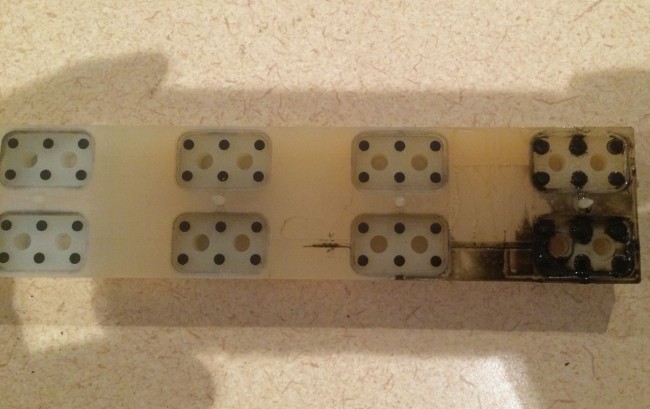
RS-18 Millenium console on/off button membrane

To make things worse, this was spilled on the main mic on/off buttons.  These button membranes come in groups of six and are not inexpensive.  The complaint was “The main mic will not turn off.”  Ah well, I am paid to fix things after all.  The DJs are only inconveniencing themselves at this point.

Whatever happened to the CFA?

Remember way back when, perhaps in high school or college, you met this really cool person who seemed to be wonderful in every way? Yeah, then you got to know them a little better, and, well, those first impressions changed a little bit.

Crossed Field Antenna, Courtesy of Wikipedia

The Crossed Field Antenna (CFA) sort of reminds me of my first prom date.  There was a lot of promise there, but plans fell through.

From a 1999 Radio World article:

Imagine an AM antenna one–fiftieth of a wavelength long, that needs no radial ground system, occupies a small parcel of land, produces little or no RFI (Radio Frequency Interference), has great bandwidth and performs better than a full–sized vertical radiator.

This potential new antenna was all the rage during the early 00s or whatever you call that decade.  I remember thinking to myself; I will believe it when I see the test results.  At one point, there was a battery of tests run in the installation in Egypt and China.  The test results are spotty at best, however, none of these installations performed up to expectations.  While it looks like a cool idea, and it would have been great to see it succeed, it seems that sheer willpower alone will not make a particular system work outside of the laws of physics.  There are a few of these still in operation out in the wild, mostly in Egypt.

Fixing small problems

This happened recently at an AM station we were doing work for. It seems the modulation monitor was not working when connected to the backup transmitter. A quick check of the RG-58 coax showed that I had the correct cable plugged into the monitor selector relay.  Another check with an ohm meter showed the cable was okay.  Then I looked at the connector on the monitor port of the transmitter and saw this:

BNC connector pin  improperly located
BNC connector pin improperly located

Looks like the pin is too far back in the connector. This is an old-style BNC connector with solder in center pin:

BNC connector center pin
BNC connector solder type center pin

The center pin has a blob of solder on it, preventing it from seating properly in the connector body. I could have lopped it off and applied a new crimp on connector, but my crimp tool was in the car. I didn’t feel like walking all the way through the studio building, out into the parking lot and getting it. Therefore, I used a file and filed off the solder blob then reassembled the connector:

BNC connector
BNC connector

The transmitter was installed in 1986, I think the connector had been like that for a long time.

It may seem like a small detail to have the modulation monitor working on the backup transmitter, however, the modulation monitor is also the air monitor for the studio.  Switching to the backup transmitter but not having a working air monitor would likely have caused confusion and the staff might think they are still off the air.  I know in this day and age, a lot of station do not even have backup transmitters, but when something is available, it should work correctly.

I like my cool network analyzer and all that, but sometimes it is the Mark 1, Mod 0 eyeball that gets the job done.

Network Security, part II

With the spate of ransomware and crypto virus attacks on automation systems, perhaps a quick review of network security is in order:

  1. Isolate the automation system on a separate network from the general office network and do not allow internet access on the automation system’s workstations or servers.
  2. Use a separate switch for all automation network connections.
  3. install a small router between the automation network and the office network.  On the router, the WAN port faces outward toward the office network, making the WAN port non-pingable.  Grant access from the office network for certain users; e.g. traffic, music director, etc via access lists.  Open up a few ports for VNC or RDP on the router so technicians can remotely access machines to do maintenance and troubleshooting.
  4. Use supported and up-to-date operating systems.
  5. Use separate admin and user accounts, make sure that admin rights are removed from user accounts, and keep machines logged in as users.  This ensures that some errant DJ or other person does not install any unauthorized programs.
  6. Install and keep up to date with a good antivirus program.
  7. Back up the data and test the backups.

The office network is more vulnerable because of the human element.  Internet access is required, of course.  Click on a pop-up, sure!  Hey, that photograph has a funny file extension, lets’s open it and see what it is.  I never heard of this person before, but look, they sent me an executable!

Much of the office network security will rely on the quality of the router connected to the internet and the antivirus software installed.  Of course, the network users have a good deal of responsibility also.