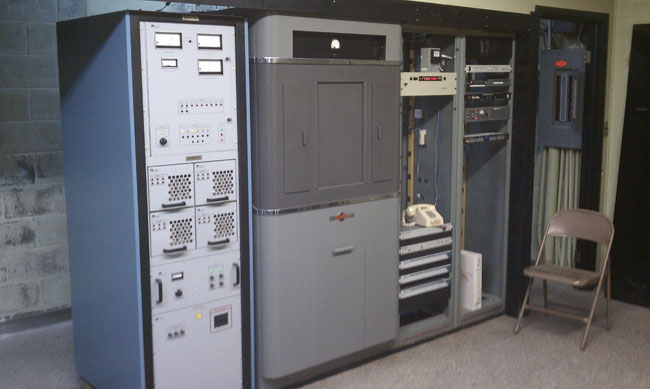
This transmitter is about 10 years old. In ten years of service, there have been no failures. Not one transistor has gone bad. It is connected to a three-tower directional array on 920 KHz.
WGHQ Nautel ND-5 transmitter
Sadly, this model transmitter is no longer made. They were built like tanks, heavy gauge steel cabinets, well-designed, well-grounded circuit boards.
It is dirt simple; RF power MOSFETs on drawers, combined and tuned with the output network. A power supply, exciter, and simple control logic and nothing else. No serial port to plug a computer into, no ethernet ports, no digital read-outs, fancy efficiency optimizing computers, etc. In the meantime, it does what it is supposed to do, stay on the air.
I was reading, with interest, the idea of “energy star” transmitters. I think that good radio station engineers already take electrical efficiency into account when buying a new transmitter. That being said, electrical efficiency is not the only measure of efficiency an engineer should be considering. Reliability, redundancy, and repairability must also be considered. If the station spends an inordinate amount of time on the old backup transmitter while the new, super-efficient main transmitter is off line is counterproductive. Not to mention the time wasted troubleshooting which could be better spent on something else.
Radio stations more and more revolve around networked computers. Engineers need to understand computer networking, especially as it relates to audio distribution and playback. Eventually, I see broadcast engineers being more computer science types rather than electrical engineering majors.
What I have found out about computer networking is this: it is not rocket science. In fact, most of it is pretty easy. Physical networking and cabling are similar to audio and TELOC cabling. Automation computer servers themselves are not difficult to understand as most of them run on some type of Windows program. Other servers such as Apache for WWW and for FTP and streaming run on some type of LINUX OS. LINUX is also not difficult to understand so long as one knows the right command line prompts.
The first part of understanding computers is networking. Without a computer network, a computer is a glorified typewriter. Almost every automation system and or digital editor requires some type of network. Consoles and computers that use AOIP require well-constructed networks in order to operate properly. To that end; cabling choices, network interface devices such as switches and routers, patch panels, and so forth need to be specified and installed with care.
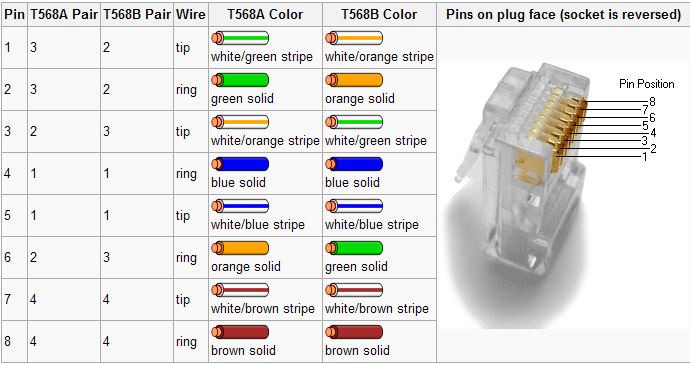
Most often, it is the simple things that will trip an installer up. The one area where I have found the most mistakes made is the pair’s connection to various termination points. There are two basic standards, TIA/EIA T568A and T568B. Neither is better than the other, both are often identified on terminating devices such as jacks and patch panels. The most important aspect of these standards for an installer is to pick one and stick with it.
TIA/EIA 568 color code
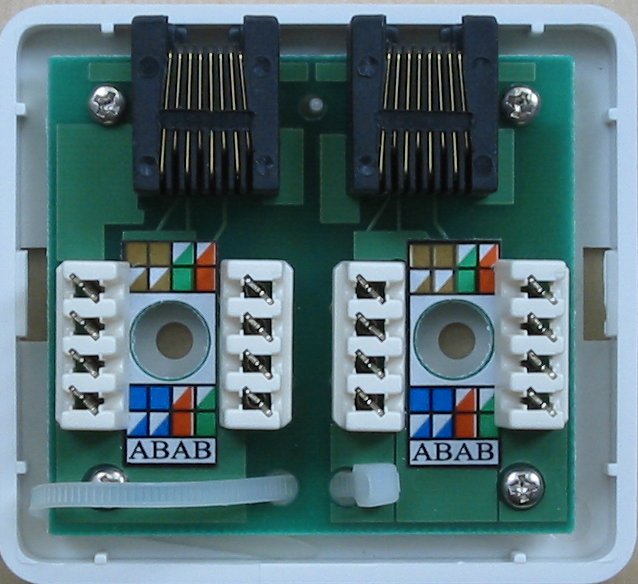
When certifying networks, the most common problem I have encountered is crossed pairs. Almost invariably, one end will be punched down with the A standard and the other with the B standard. Jacks are particularly difficult, as the color-coding stickers show both. Many patch panels have a slide-out, reversible card with is an either/or situation. For some reason, I have stuck with the B standard, and on any project I am managing, I get rid of all the A color codes I can find and tell the installers that B is the only acceptable termination standard. That cuts down on a lot of errors and redos during certification. That is good, it saves time and I hate redos.
Cat 5e wall jack set
You can see that this color code marking can lead to confusion. I take a sharpie and cross out all the A markings to avoid installation mistakes.
Incidentally, on any new network installation, Category 6 cable should be used. As more and more data throughput is required for network applications, Category 6 Cabling has better performance specs and will likely have a longer service life than another cable. It may be a little bit more expensive than Cat 5, however, well worth the investment. It would be a great mistake and a waste of money to have to pull out the network and reinstall it in a few years because the cabling doesn’t have the required bandwidth.
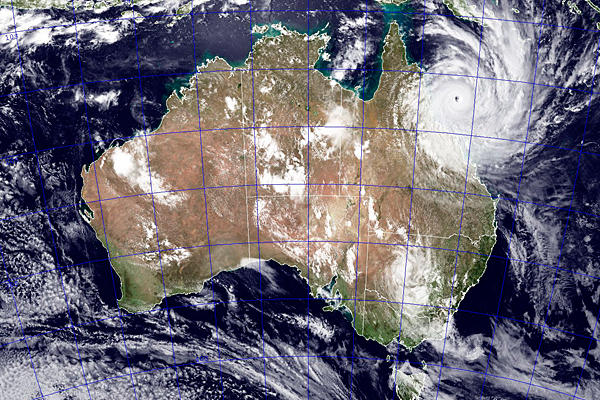
Super Tropical Cyclone Yasi, a category 5 storm, came ashore this morning between Cairns (pronounced Cans) and Townsville, Queensland around midnight Thursday (9 am Wednesday, NY time).
Tropical Cyclone Yasi, February 2, 2011
Radio Australia carried Australian Broadcasting Company (ABC) Queensland coverage of the storm, which was extraordinary. Spot coverage, emergency information, sheltering information, updates, and calls from listeners in the midst of the storm. Some of it is pretty intense. One fellow, John, out in the country all by himself in the height of the storm sounded somewhat forlorn, I hope he makes it.
Due to the size of the storm, widespread power outages are expected and may last for weeks or months. As a part of this, there are numerous outages and potential outages in their AM and FM broadcasting chain. To that end, ABC has two shortwave frequencies available for their Queensland service; daytime (8 am to 8:30 pm local time, 2100 – 0830 GMT) on 9710 KHz and night time (8:30 pm to 8 am local, 0830 – 2100 GMT) is 6080 KHz.
Once again, HF (shortwave) radio gets the job done when local stations, cell towers, and internet connections to dead. Sometimes it is the low-tech answer.